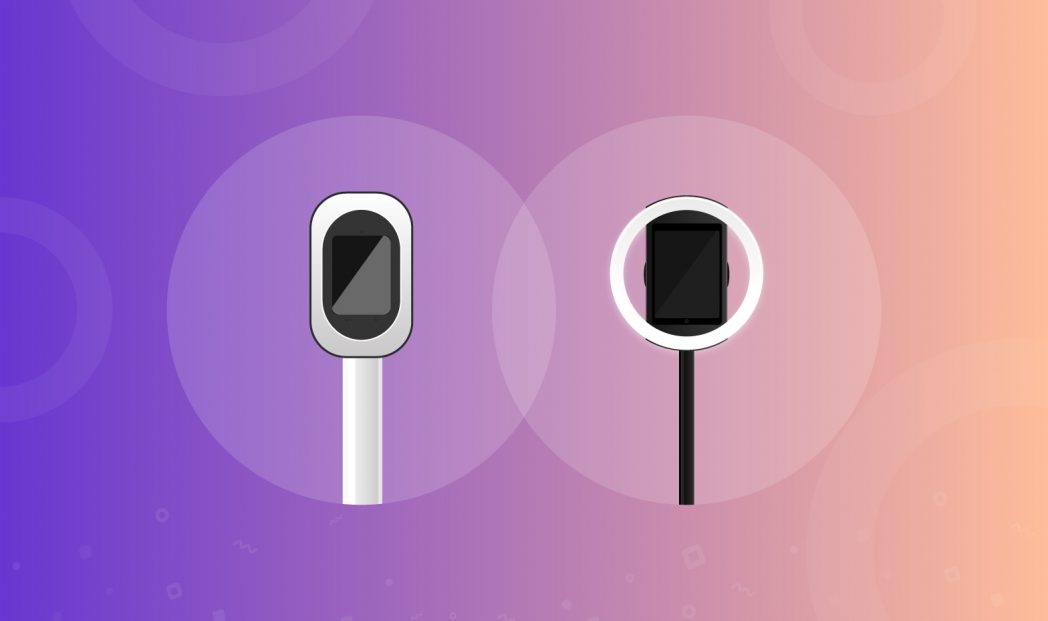
Simple Booth HALO® and Salsa Booth are both photo booth solutions with robust hardware and intuitive software for seamless event experiences. However, if you look into their origins, design philosophies, and functionality, you’ll notice many subtle yet important differences that cater to separate audiences.
Simple Booth HALO is perfect for entrepreneurs and companies in need of a simple and effective photo booth solution. It boasts hardware that ensures quick deployment, user-friendly setup, and—running on it—a highly customizable modern photo booth app with extensive layouts and themes. Altogether, HALO is a flexible solution for a diverse set of events.
Meanwhile, Salsa Booth is costly to buy and own for photo booth businesses and entrepreneurs. However, it offers customization options, a community for photo booth rental companies, and some other details we cover in the article that make it a sensible option for photo booth rental companies.
In this article, I explore HALO vs Salsa Booth across the following dimensions:
- Hardware,
- Photo Booth Features,
- Marketing Tools,
- and Pricing.
Let’s start with a quick summary.
Comparison Summary: HALO vs Salsa Booth
| Simple Booth HALO | Salsa Booth |
|---|---|
 |  |
| Price | |
| 🏆 ⭐⭐⭐⭐⭐ Budget-friendly and flexible; software plans starting at $14.99/week for Lite (available through the App Store), with monthly and yearly options. Hardware starts at $2,090. The Simple Care extended warranty costs $299. 7-day free trial. | ⭐⭐⭐⭐ Salsa Booth requires a higher initial investment, with software starting at $59/mo. Hardware packages start from $2,999 and go up to $9,399. The Salsa Care extended warranty costs $299. 30-day free trial. |
| Hardware | |
| ⭐⭐⭐⭐ Straightforward design and effortless plug-and-play setup. Works with select 11″ and 10.9″ iPad Air and 11″ iPad Pro models. | 🏆 ⭐⭐⭐⭐⭐ Integrated fan for cooling in hot weather. Supports several iPad, iPad Pro, and iPad Air models, including larger 12.9″/13″ sizes. |
| Photo Booth Features | |
| ⭐⭐⭐⭐⭐ 75+ tagged, searchable themes and unlimited custom layouts built in the Layout Designer. Sharing via text, email, QR code, AirDrop, and WhatsApp, plus Instagram, Facebook, and X. | ⭐⭐⭐⭐⭐ 240+ templates plus a Design Studio for building custom layouts and templates. Sharing to Instagram, Snapchat, Facebook, X, Tumblr, and Pinterest. |
| Marketing Tools | |
| 🏆 ⭐⭐⭐⭐⭐ Lead capture forms with customizable data fields. Lets participants download pictures without sharing information. Mailchimp and API integration. Live Feed feature enhances your marketing efforts and lifts the atmosphere. | ⭐⭐⭐⭐ Customizable surveys and data-capture forms for collecting attendee information. Slideshow feature streams event photos in real time on TVs and other displays. |
| Customer Support | |
| ⭐⭐⭐⭐⭐ Email and chat support 7 days a week, plus a wide array of help guides. Phone support on Pro plans and up. | ⭐⭐⭐⭐⭐ Email support and help guides for every product. + Phone support for Salsa Pro plan users. Includes a community for photo booth rental company owners to collaborate. |
| Best For | |
| Photographers and businesses requiring a simple photo booth setup for promotional uses. | Rental companies looking to provide niche clients with multiple hardware options. |
| Try free! No credit card required. | Try free! No credit card required. |
What is Simple Booth HALO?
“Robust hardware. Intuitive software. Seamless photo booth.” 🔧💻📸
The idea for Simple Booth became set in motion in 2012 when a friend of Mark Hennings asked him to set up a photo booth for an entrepreneurship conference after-party. In 2013, he developed the first version of the app alongside designer Alex Kirts, before joining Jeremy Cox to expand the software functionality and create hardware products. In 2016, the company grew rapidly and the team expanded, earning a spot in the Inc 500 in 2018.
The simple design of the Simple Booth HALO hardware ensures that setting up the device is as effortless as possible. You can get the robust stand and case version if you do a lot of moving around, or go for the more affordable wall-mounted setup if your photo booth is fixed. Meanwhile, the software is customizable and easy to navigate. Participants can capture videos and photos with filters or stickers and share their experiences to create a buzz and promote your events or locations. Also, event organizers can collect lead data and view analytics, while maintaining privacy.
HALO is the best option for photo booth businesses seeking a cost-effective and innovative marketing approach. That’s because it’s easy to set up and operate even without technical expertise while offering a professional experience that fits any brand.
What is Salsa Booth?
“Create opportunities to capture memories” 📸✨
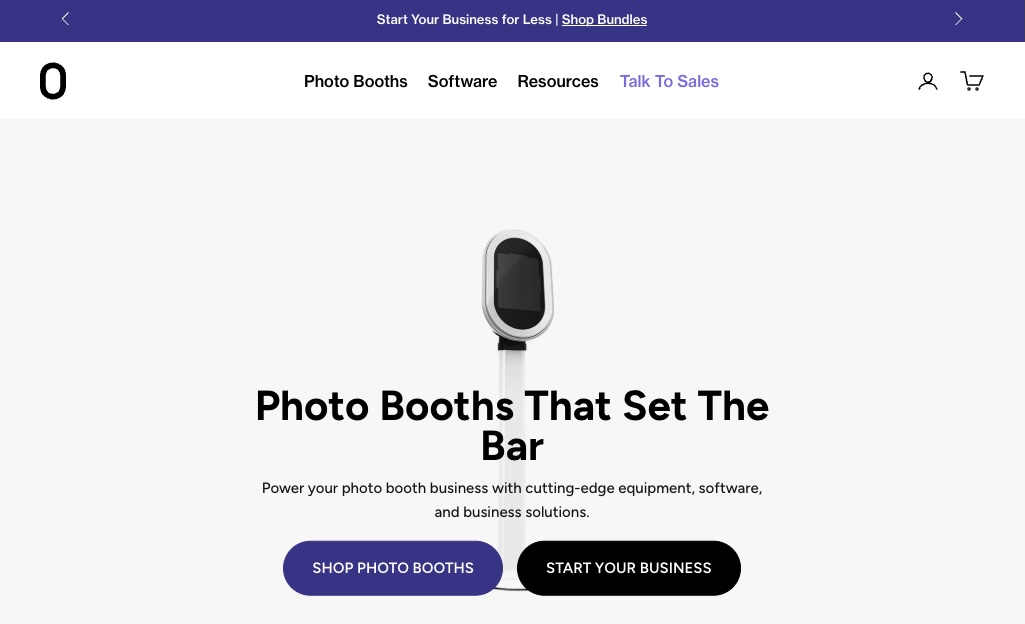
In 2010, Brandon Wong and his wife Katrina Santos founded a wedding photography business to help people document memories. It wasn’t until 2011 that they invested in a photo booth as an add-on service. They saw the opportunity to provide photo booths as a fun, profitable, and creative business for other entrepreneurs.
Salsa Booth is one of several products made by Photobooth Supply Co. It has a built-in fan for outdoor events in sunny weather, supports multiple iPad, iPad Pro, and iPad Air models, and comes with extra hardware (like backdrops) on higher plans. Meanwhile, the software allows participants to capture photos and videos, add digital props and filters, and share them on social media to promote events and capture memories. Owning a Salsa Booth also gives you access to a community of photo booth rental companies where you can connect and collaborate with people in similar situations.
Salsa is expensive, making it better to rent than own. That’s why it works for rental companies that serve a wide range of niche events.
HALO vs Salsa Booth: Hardware
HALO is easier to set up, while Salsa Booth supports more devices.
| HALO | Salsa Booth |
| ⭐⭐⭐⭐ | ⭐⭐⭐⭐⭐ |
Simple Booth HALO offers a plug-and-play setup, while Salsa Booth sets up quickly with a single cord.
HALO is straightforward to set up thanks to its plug-and-play design. You can have it ready within minutes of arriving at an event, with no fiddling with intricate connections since you only assemble and fasten the parts together.
Check out just how simple it is to set up:
The original Salsa (Salsa 1) had a more involved setup. You looped the cord from the base through the stand up to the head unit, which added a bit of time, especially if you moved between events often.

Salsa 2 streamlined this. It now uses a single USB-C cord routed through an internal cable conduit in the poles, keeping setup fast and tangle-free.
Salsa Booth’s integrated fan improves performance in hot weather, while Simple Booth HALO prioritizes simplicity.
Salsa addresses potential environmental challenges by incorporating a built-in fan.
It keeps the performance consistent in hot weather when other booths might struggle, making it optimal for rental companies serving many clients with diverse working conditions.
On the other hand, HALO is designed for simplicity.
It doesn’t have a built-in fan, but can still be used outside on a hot day as long as it’s in the shade. That is a best practice anyway, since screens are very difficult to see in direct sunlight, and there’s no guarantee that a fan inside the unit will be enough to keep the iPad from shutting off due to overheating.
Simple Booth HALO supports the 10.9″ iPad Air, 11″ iPad Air, and 11″ iPad Pro. Salsa Booth supports a range of iPad models, with which faceplate you need depending on the model you choose.
HALO works with a variety of iPad models, including the more budget-friendly 10.9″ iPad Air (4th and 5th gen), the 11″ iPad Air (M2, M3, and M4), and the 11″ iPad Pro (1st through 4th gen). The 10.9″ iPad Air is the most affordable option, while the newer Air and Pro models offer more processing power if you want it. Simple Booth regularly updates its faceplate lineup to stay compatible with recent iPad releases.
Salsa Booth also supports several iPad models. Faceplate compatibility depends on the size you choose (Salsa offers faceplates for both 11″ and larger iPads), so it’s worth checking Photobooth Supply Co.’s specs to confirm your specific model is covered and whether the faceplate you need is included or purchased separately.
Salsa also lets you customize the look of your booth with custom branding on the hardware itself. The diverse support and brand customization could appeal to photo booth rentals that cater to clients with different hardware needs.
Simple Booth HALO shines much brighter while Salsa Booth offers more lighting customization options.
HALO’s ring light is controlled by a dimmer knob on the side and puts out up to 2,100 lumens, so it can get very bright, enough to light groups standing several feet back.
Salsa’s lighting is controlled through the iPad, which gives it options like animating colors while idle and switching to white light when it’s time to take photos, a nice touch for catching people’s attention.
However, there’s a tradeoff.
Some Salsa users have mentioned that they needed additional lighting for the pictures to turn out great. On the other hand, HALO’s light is a lot brighter because it’s made to prioritize picture quality—so you’ll rarely have to worry about lighting with it.
Winner: Salsa Booth wins by a sliver because of its versatility for niche events and compatibility with more iPad models. While it isn’t as convenient to set up as HALO, it’s not a big hurdle. Meanwhile, Simple Booth HALO is faster to set up than Salsa, allowing participants to start using it in under 5 minutes.
HALO vs Salsa Booth: Photo Booth Features
HALO has more layout customizations and better navigation than Salsa.
| Simple Booth HALO | Salsa Booth |
| ⭐⭐⭐⭐⭐ | ⭐⭐⭐⭐⭐ |
Simple Booth HALO’s themes are tagged and searchable, while Salsa Booth offers a larger template library to browse.
Themes give your start screens and app backgrounds a distinct look.
Simple Booth HALO offers a large library of themes covering events from birthdays, weddings, and anniversaries to national celebrations like Independence Day. Every theme is tagged and searchable, so event organizers can quickly find one that matches their event. You can also request new themes through the chat window or upload your own custom start screens and app backgrounds.

The Salsa app offers a larger template library that also spans a wide range of global events.
Like HALO, Salsa lets you upload custom start screens and app backgrounds, and set a disclaimer screen to show guests essential terms about the use of their images.
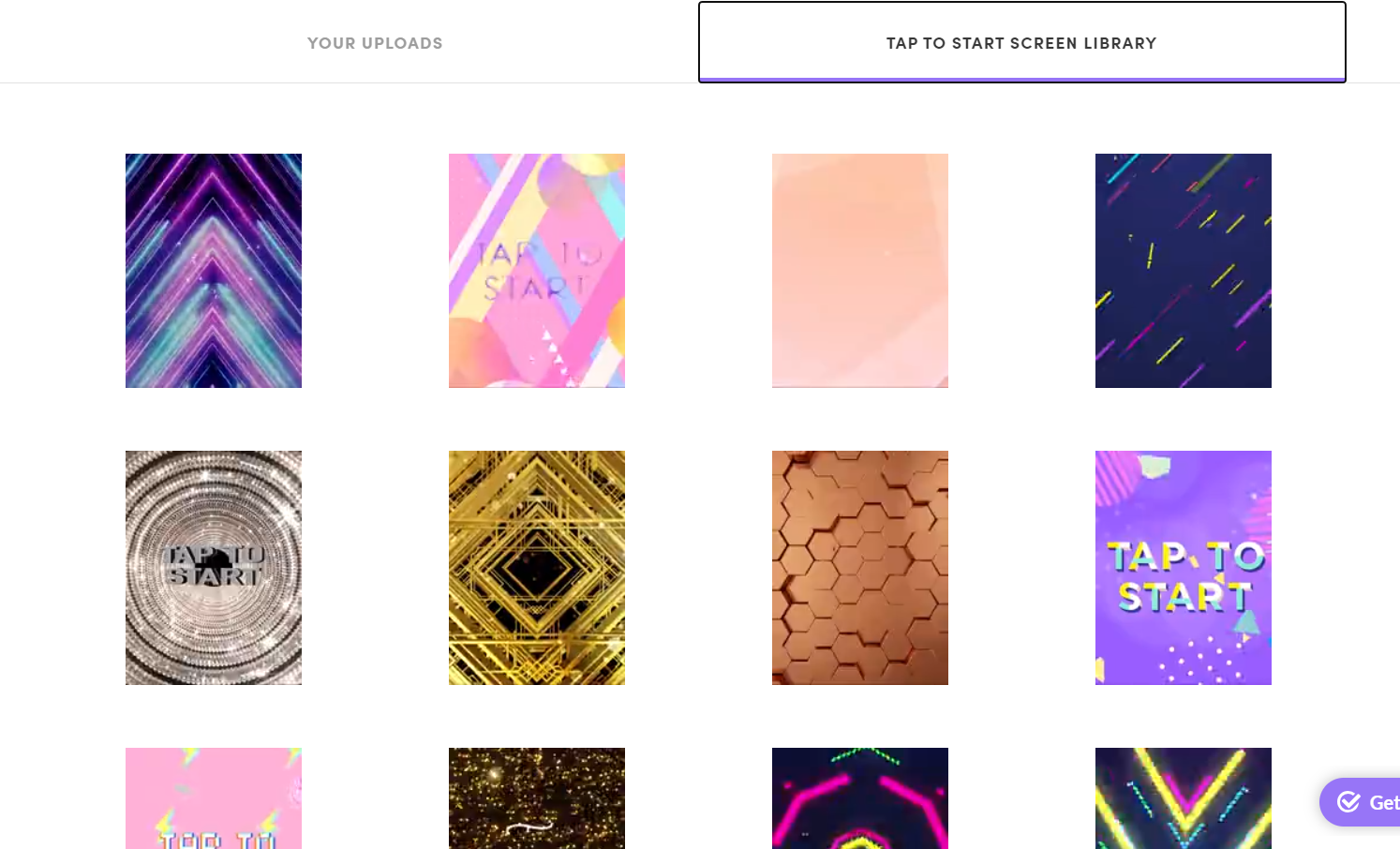
Both apps also offer filters and stickers (or props) to enhance guests’ photos, and both let you upload custom stickers to stay on brand.
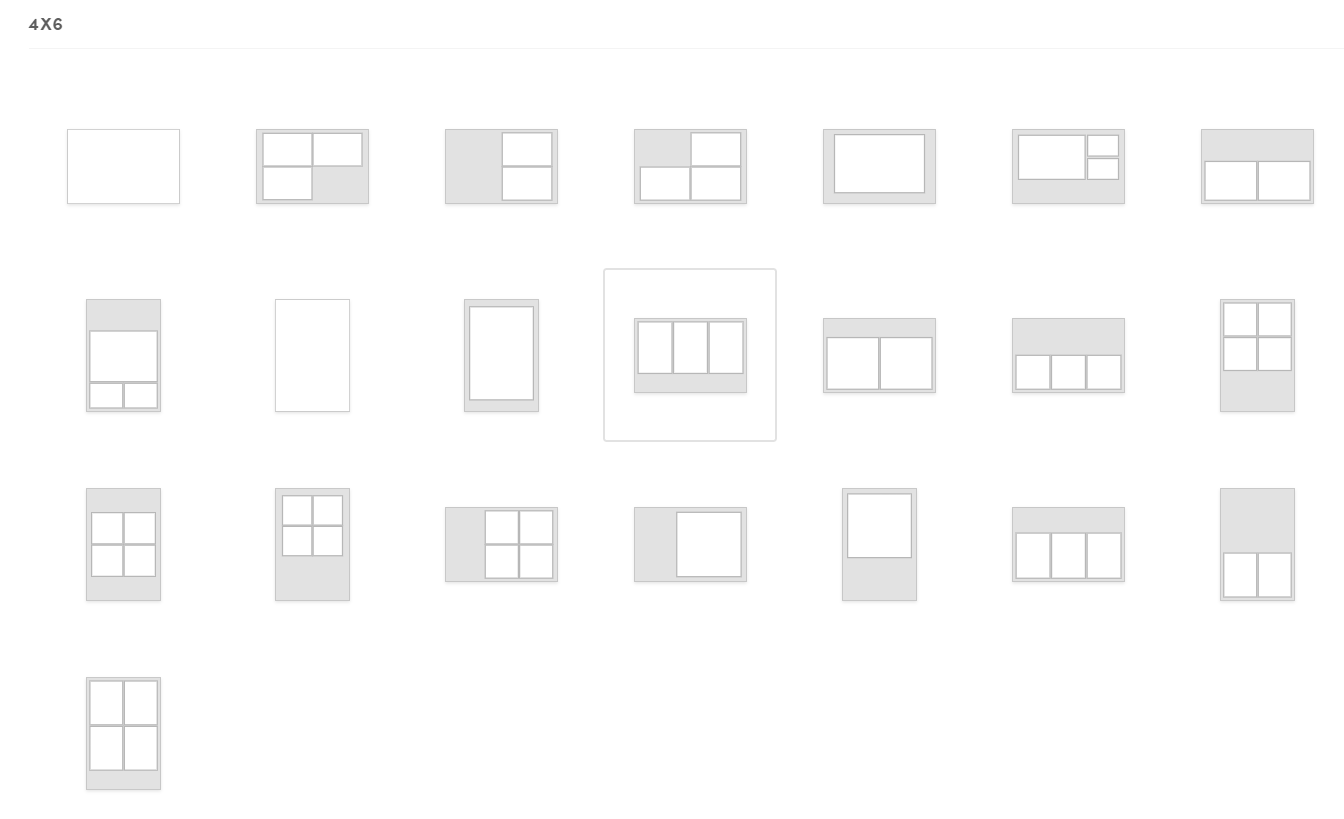
Simple Booth HALO lets you design and import unlimited custom layouts in its Layout Designer, while Salsa Booth offers custom templates through its Design Studio.
This is where HALO stands apart. Rather than a fixed set of layouts, HALO’s Layout Designer lets you build as many custom layouts as you need, right from the app or the web dashboard. Start from single-frame layouts, photo strips, grids, or spotlight layouts, then design freely on a layer-based canvas.
You can set a custom canvas size (or pick from common presets), adjust frame margins and per-side padding, choose square, portrait, or landscape crops, add logos and overlays, and set solid or gradient backgrounds.
Single-frame layouts can also output motion formats: GIF, Rebound (similar to a boomerang), Live GIF, or Video, with adjustable frame count, speed, and video length. On the Core plan and up, you can offer multiple layouts and let guests pick their favorite before a session.
You can also import your own designs or themes directly into the Layout Designer, similar to building custom templates in Salsa’s Design Studio, with no cap on how many layouts you create.
Salsa also offers layout flexibility through Fiesta’s Design Studio. It includes a library of preset layouts across common sizes like 2×6, 4×6, and 6×6 in portrait, landscape, square, and strip formats, and you can build custom photo templates and layouts in the web app using a drag-and-drop editor.
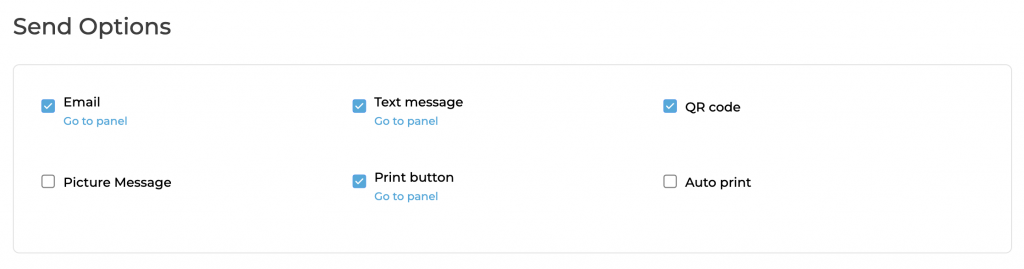
Simple Booth HALO and Salsa Booth have similar sharing options, but Salsa supports more social media platforms.
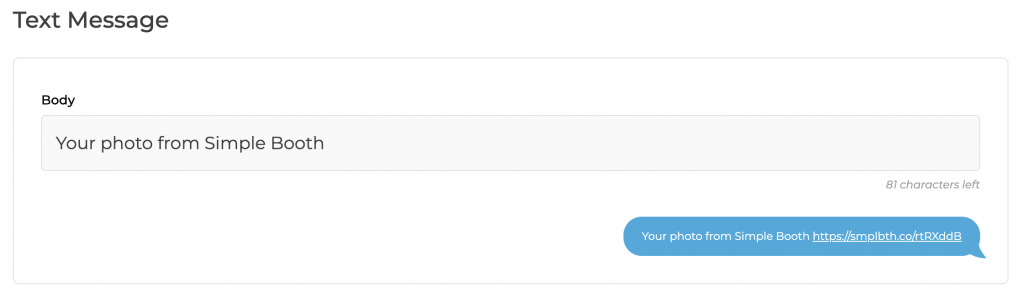
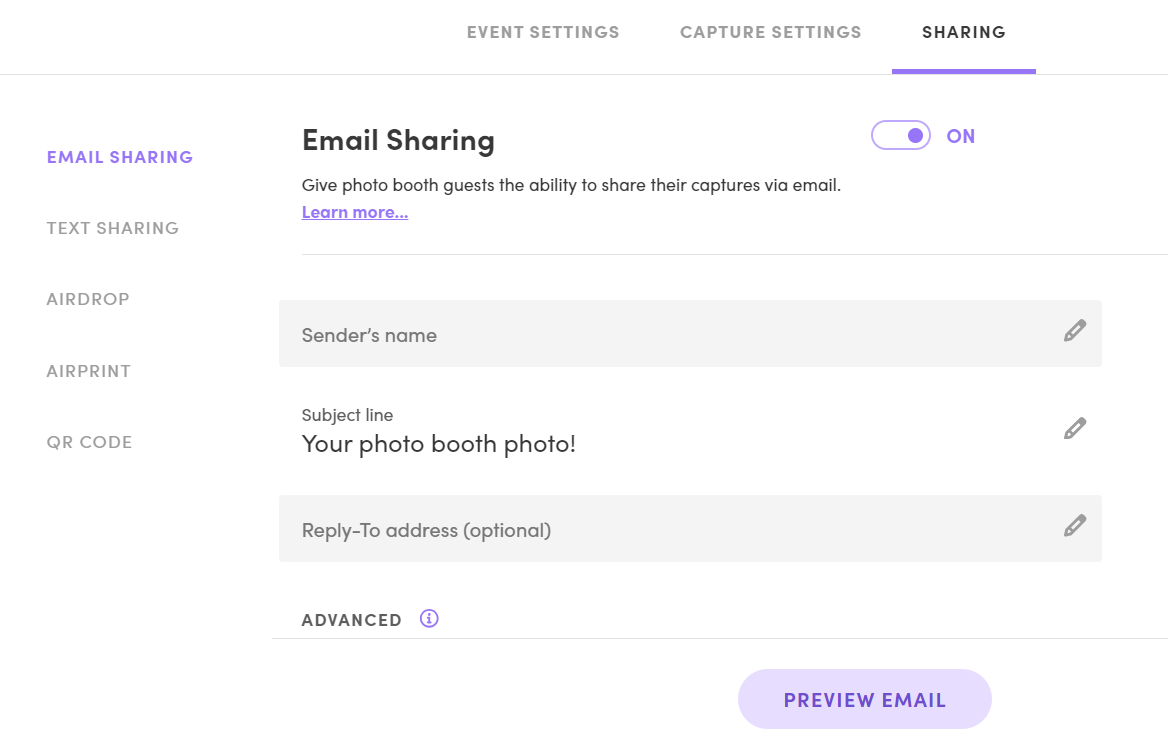
HALO‘s send options include text message, email, QR code, WhatsApp, and AirDrop. There’s an option to print pictures on request or enable auto printing using printer models that support Apple’s AirPrint technology. And you can choose which of these to make available to participants.
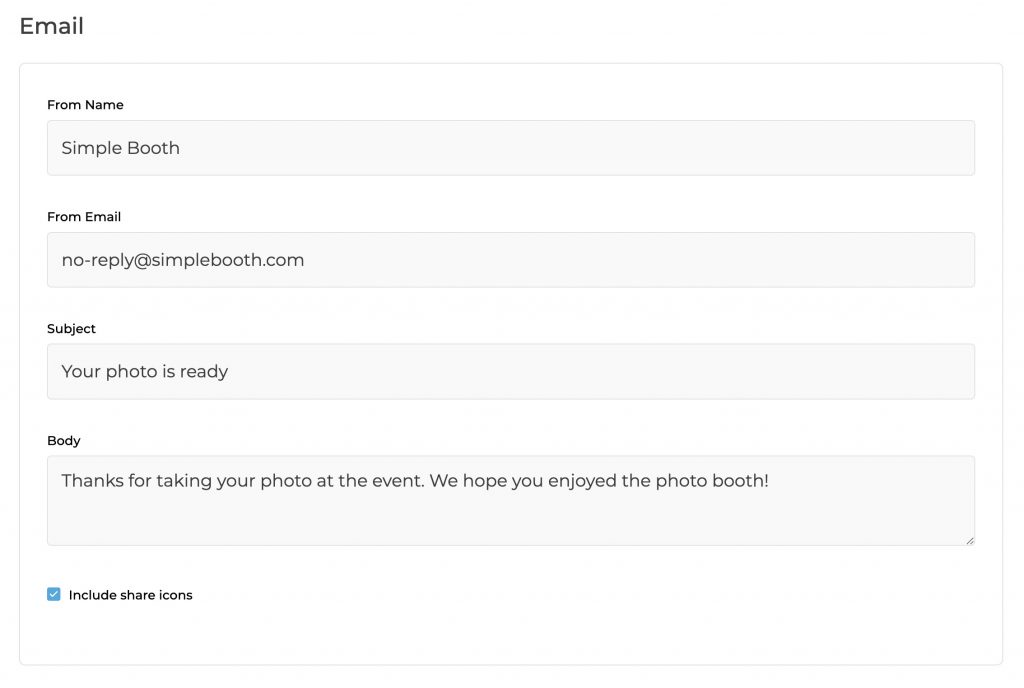
The email and text message content that gets sent to the participant can be customized.
Social sharing is available from the gallery once participants receive the link to their image, where they can post to Instagram, Facebook, Twitter, LinkedIn or download the image/video file.
Salsa also supports sharing via text message, email, QR code, and AirDrop. You can also connect to multiple printers supported to use AirPrint. From the live gallery, users can share images on Facebook, Twitter, Tumblr, and Pinterest.
The app supports Instagram and Snapchat, but you need to access the online gallery on your phone to get these options. Salsa Booth also lets you customize the text message and email content.
Note: Both apps can be found in Apple’s App Store only, since they’re both iPad photo booths.
Winner: The HALO app has an intuitive user interface that’s easy to navigate and highly customizable, helping business owners find what they need to provide a unique experience. It supports social sharing over all the common social media like Instagram, Facebook, and Twitter. Meanwhile, The Salsa app offers more themes and social sharing options but is harder to navigate and customize for specific events. Both are great professional photo booth apps!
HALO vs Salsa Booth: Marketing Tools
HALO allows users to opt out of giving out information, while Salsa doesn’t.
| Simple Booth HALO | Salsa Booth |
| ⭐⭐⭐⭐⭐ | ⭐⭐⭐⭐ |
Simple Booth HALO offers extensive lead capture forms that users can opt out of, while Salsa Booth requires participants to always complete the survey before obtaining their captures.
HALO offers a comprehensive lead capture feature beyond traditional surveys.
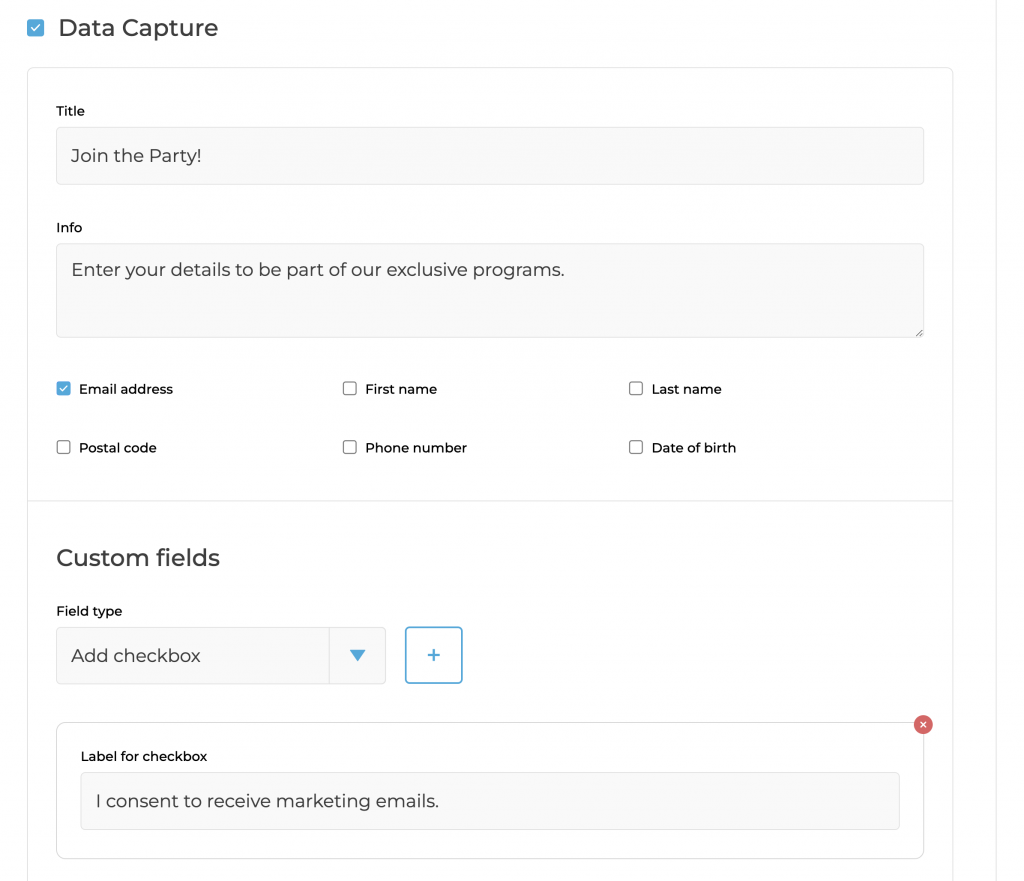
The app allows for you to turn on standard data fields to tailor the form to gather specific participant information, such as email, first name, last name, postal code, and so on. After one person adds their information, the next can fill out the form, too—which is great since groups are common in photos.
Additionally, you can create custom fields which can be a text input, checkbox, or required checkbox, if you can only capture their information if they agree to something, for example. You can even add a custom Terms of Service or Privacy Policy.
Individuals can opt out of sharing their information and still receive their pictures. There is also an advanced Personally Identifiable Information (PII) purging tool for businesses that need to remove data after a certain time.
The built-in MailChimp support and API integration in Simple Booth facilitate the direct transfer of captured information so you can build your email list immediately.
The Salsa app is more basic than HALO.
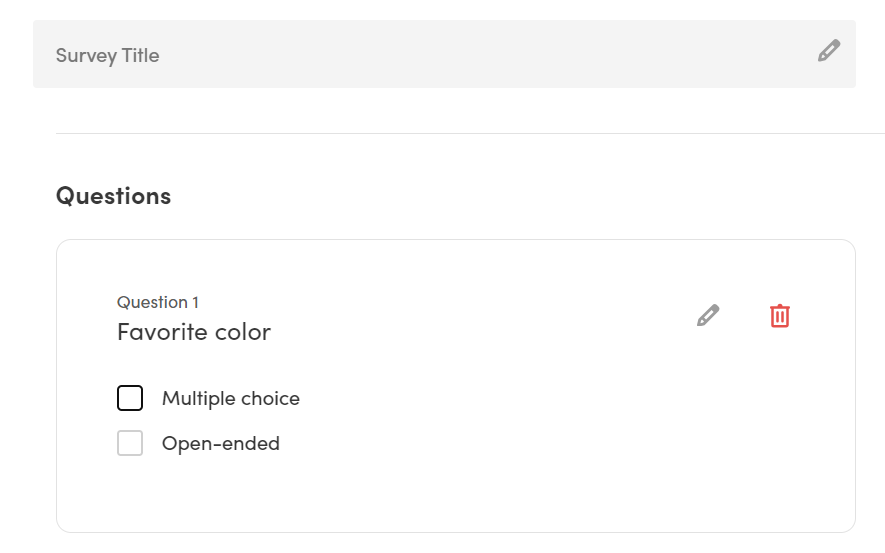
It lets you collect data through customizable surveys that may include one or several inquiries with open-ended or multiple-choice questions. But it doesn’t offer the option to survey individual participants in case there is more than one in a photo session like HALO.
Also, unlike HALO, participants are required to complete the survey before getting their captures.
Simple Booth HALO helps participants curate relevant social media hashtags while sharing pictures.
HALO lets you incorporate branding elements like your logo on photos, custom start screens, app backgrounds, multiple overlays, stickers, gallery customization, and a profile to show off your public galleries. You can also add hashtags for participants to use while sharing their photos online, allowing you to create social buzz around your business and find posts to re-share.
Salsa offers similar brand logo integration into custom start screens, app backgrounds, overlays, and stickers. But you can’t add your hashtags to the photo booth settings.
Simple Booth HALO’s Live Feed turns your event into real-time, user-generated content.
Simple Booth’s Live Feed shows a live stream of photos as they’re captured. When guests see others having fun on screen, they want to join in, so the feed feeds itself while filling your marketing pipeline with authentic photos of real people enjoying your venue or event.

Between photo sets, you can add branded slides to highlight promotions, new offers, or sponsors, right when everyone’s already watching the screen. Setup takes a click, and you can control animations, transition timing, number of photos, and layout. Slideshows run on TVs, LED walls, projectors, or a website via a simple HTML widget.

Salsa offers a similar Slideshow that plays from its Live Gallery in real time, viewable on personal devices, smart TVs with a browser, or TVs with an Amazon Fire Stick. Its customization options are more basic, without HALO’s control over transitions, layout, and in-feed ads.
Salsa Booth provides marketing materials for rental businesses, while Simple Booth HALO offers business resources and a personalized onboarding.
Salsa’s marketing materials include ready-made templates, overlays, and materials to help photo booth owners market Salsa’s unique features to their renters. These include:
- Website assets (Photos of Salsa being used in-person, renders of Salsa, and sample captures),
- Event Assets (Tap to Start screens and customizable photo template backgrounds and overlays),
- and Business tools (Sample contracts, pricing tables, pre-made posts for Facebook and Instagram stories, marketing videos, and flyers).

Simple Booth’s business resources include a marketing image library with 100+ professional photos, a customizable sample rental agreement, and a growing Facebook community where you can connect with other photo booth operators across industries. Additionally, every HALO owner gets access to a dedicated account manager for a personalized onboarding, plus support materials including videos, guides, and a comprehensive help center.

Winner: Both apps are similar. But HALO lets you choose whether participants can skip the lead capture process which is nice if you aren’t trying to collect participant data and just want to spread the word about your event. On top of that, they offer business resources and a personal touch to get you started. Meanwhile, Salsa might be a better fit if you’re a rental business and want access to their extensive marketing materials.
HALO vs Salsa Booth: Pricing
Simple Booth HALO is more affordable and offers more flexible subscription plans than Salsa Booth.
| Simple Booth HALO | Salsa Booth |
| ⭐⭐⭐⭐⭐ | ⭐⭐⭐ |
Salsa Booth is available in $49/mo and $99/mo tiers, while Simple Booth HALO offers five tiers to accommodate businesses with varying needs.
Simple Booth offers a flexible range of pricing tiers tailored to meet the diverse needs of businesses and professionals engaging in event photography:
- Lite is $29.99/mo through the App Store, offering filters, effects, a library of themes and props, and interactive galleries.
- Core is $49/mo, contains everything in Lite + supports green screen and video capture, and removes ads.
- Plus is $99/mo. It supports everything in Core alongside custom props, branding and messaging, analytics, and reporting.
- Pro is $149/mo. It adds lead and data capture, advanced text messaging, frame rotation, and more to the Plus plan.
- Select is $249/mo. It contains everything in Pro + photo moderation, age gate, and data compliance tools.
Simple Booth also offers weekly plans starting at $14.99/wk for Lite (available through the App Store) and $24/wk for Core.
Meanwhile, Salsa Booth software has a pricing model with two plans:
| Salsa Plus | Salsa Pro |
| $49/month Unlimited events and captures, Basic analytics and galleries, Email support. | $99/month Everything in Plus, AirPrint, surveys, and green screen, Advanced analytics and galleries, Email and phone support. |
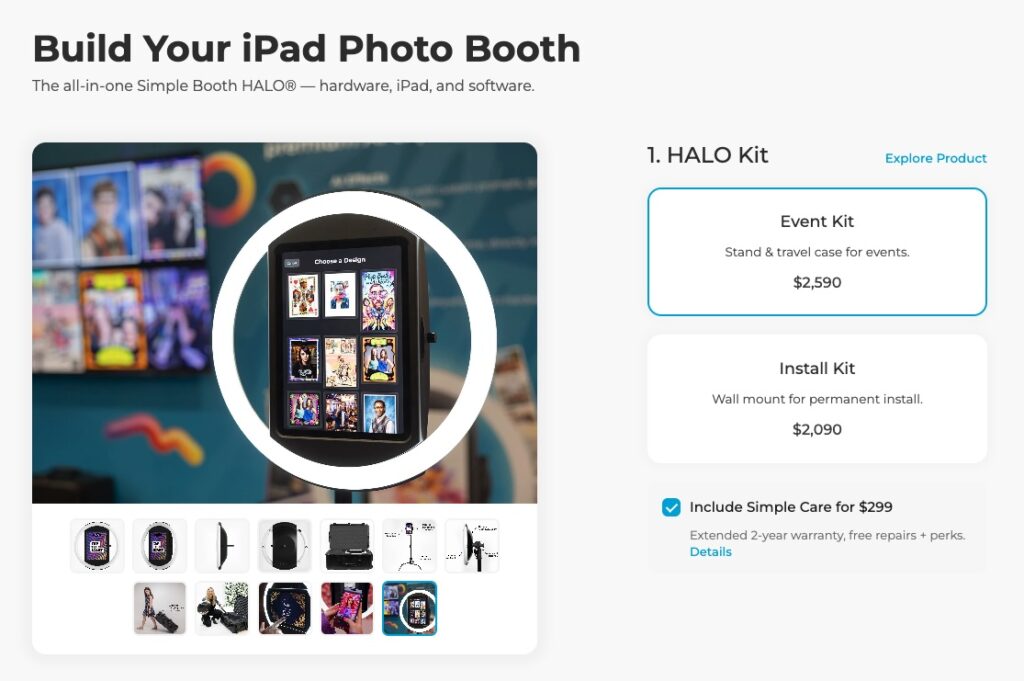
Simple Booth HALO hardware costs less than Salsa, with some kits running up to roughly $900 less.
Simple Booth HALO hardware costs less than Salsa Booth 2, with some kits running up to roughly $900 less.
HALO’s hardware pricing is competitive. The Event Kit, including a stand and case, is $2,590, and the Install Kit with a wall mount is $2,090 — both below Salsa Booth 2’s $2,999. Neither HALO nor Salsa includes an iPad, so you can use one you already own or add a new iPad Air (M4) for $749.
Comparing like for like, a complete HALO setup with a new iPad runs $3,339 (Event Kit plus iPad), while an equivalent Salsa setup would be $3,748 (Salsa’s $2,999 plus a $749 iPad), so HALO comes in around $400 less once both booths have a tablet.
That affordability makes Simple Booth HALO a strong option for anyone looking to own a complete photo booth solution for their own services or marketing.
In contrast, Salsa Booth hardware requires a higher initial investment. Like HALO, it needs an iPad, but Simple Booth offers iPads with its kits, while Photobooth Supply Co. leaves you to source one on your own.
- The Starter Package is priced at $2,999 and comes with the basics (the photo booth, a carry case, a charger, a 12.9″ iPad Pro faceplate, and a limited 1-year warranty).
- The Essentials Package comes in at $4,999 and adds a backdrop and stand, 2-year coverage with 50% off replacement parts, one year of Salsa Pro software, and branded marketing materials.
- The Growth Package costs $9,399 and includes two booths for scaling.
Comparing the closest equivalents (hardware only, since neither price includes an iPad), Salsa’s Starter Package is $2,999, while HALO’s Event Kit with a stand and case is $2,590, or $2,090 for the Install Kit with a wall mount. Both booths need an iPad, and the totals still favor HALO: a complete HALO with a new iPad Air (M4) runs $3,339, versus $3,748 for Salsa’s Starter plus the same iPad, with the added convenience of buying everything, iPad included, in one kit.
Neither HALO nor Salsa’s Starter Package includes a backdrop. Salsa bundles one at the Essentials tier, but if you want a backdrop with HALO, there are affordable third-party options like this one (Simple Booth is not affiliated with this provider).
Both companies also offer financing. Salsa Booth offers it directly, while Simple Booth uses Shop Pay installments.
Both companies have similar standards and extended warranties.
Simple Booth HALO comes with a standard 1-year warranty that covers manufacturing defects and mechanical failures, excluding batteries and external components prone to wear and tear. For an additional $299, you can add Simple Care, which doubles coverage to two years, includes accidental damage protection (up to two incidents, fully covered), and offers 50% off replacement parts or faceplate upgrades. Simple Booth also accepts eligible returns within 30 days of purchase (some exceptions apply) if the product is new and unused.
Salsa Booth offers a comparable extended warranty. Its standard 1-year warranty covers manufacturing defects but excludes accidental, cosmetic, and wear-and-tear damage. Salsa Care doubles the warranty to two years and adds up to two accidental-damage repairs (at a $49 deductible each, versus $499 without the plan), 50% off select replacement parts, and transfers to a new owner if you sell the booth. Salsa Booth maintains a strict no-return policy under its standard terms.
Winner: Simple Booth offers more affordable hardware than Salsa Booth, and its software plans are more flexible and approachable for smaller businesses. The two warranty packages are broadly similar, though Simple Care covers accidental repairs at no cost while Salsa Care charges a per-incident deductible.
HALO vs Salsa Booth: Pros and Cons
Simple Booth is excellent for businesses and professionals seeking simple hardware and customizable software, while Salsa targets photo booth rental companies serving clients with niche needs.
| |
| Simple Booth HALO Pros | Simple Booth HALO Cons |
| ✅ Lower hardware price | ❌ No support for 12.9″/13″ iPads |
| ✅ iPad can be purchased with the kit | ❌ No built-in cooling fan |
| ✅ 30-day returns on new, unused hardware | ❌ No animated in-app lighting (manual dimmer) |
| |
| Salsa Booth Pros | Salsa Booth Cons |
| ✅ Supports larger 12.9″/13″ iPads | ❌ Higher hardware price |
| ✅ Built-in cooling fan for hot weather | ❌ iPad must be sourced separately |
| ✅ In-app animated LED ring lighting | ❌ Strict no-return policy |
Final Verdict: HALO vs Salsa Booth
Simple Booth HALO is best for most businesses of all kinds and professional marketers. Salsa Booth is best for rental companies.
| Simple Booth HALO | Salsa Booth |
| Best for: Businesses who need a photo booth that’s easy to use so they can entertain customers without hassle. | Best for: Rental companies that want to offer their clients multiple hardware options. |
Simple Booth HALO is easier to use and more customizable than Salsa Booth. It appeals to photographers, businesses, and event organizers looking for a perfect photo booth for lead promotion and unique marketing. Simple Booth comes with robust branding options, lead capture forms, MailChimp integration, and an open API. Plus, the HALO hardware is easy to set up and runs on software that’s easy to navigate, making it suitable for individuals and companies looking to get started without the hassle.
Due to the cost, Salsa Booth appeals to rental companies who want to offer multiple hardware options to clients with niche needs, including people organizing corporate events in hot weather.
So, if it’s in question which one’s the best photo booth app, it depends on what you need.
We recommend you to…
Use Simple Booth HALO if:
- You need a photo booth that can be set up in under 5 minutes.
- You want a photo booth software with robust data capture, branding, and business tools.
- You want to allow participants to opt out of data sharing.
Click here to get started with Simple Booth HALO!
Use Salsa Booth if:
- You don’t mind the cost.
- You want to use different iPad models with the booth.
- You want hardware add-ons like watermarked films and backdrops.
Click here to get started with Salsa Booth!
Looking for a sleek and durable all-in-one photo booth solution with low startup costs?