This is part three in a series about new features coming soon to HALO app. First we peeked into Print Graphics and then I explained how Configurable Settings lets you fine-tune the photo booth experience.
Today we have a new tool for the Edit Screen to reveal. It’s called Drawing and it does what it sounds like – your photo booth guests can create art on their photo or GIF by touching the screen!
Guests can choose a color and put a personal mark on their photos such as a doodle or a signature. They can choose a brush size and color, erase parts of the drawing or reset the entire canvas.
You can keep the drawings on-brand by choosing a palette of color options using new Configurable Settings.
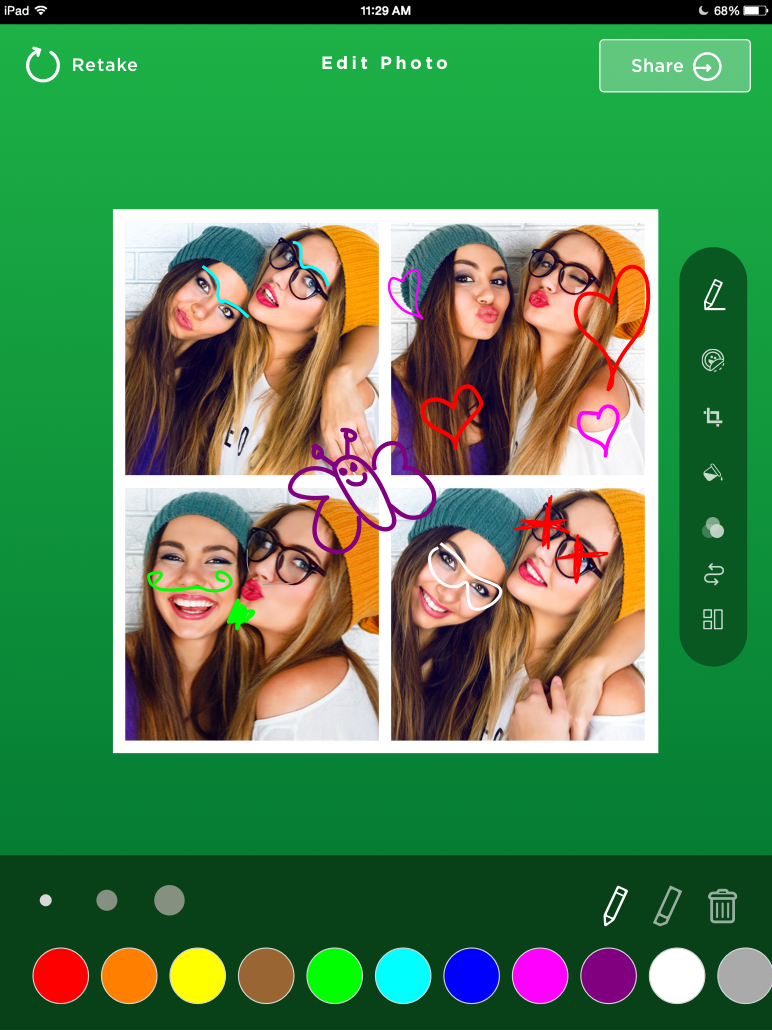
Brush strokes are rendered extra smooth with bezier curves for a pleasing effect. The brush thickness is ready to respond to touch pressure from Force Touch as soon as Apple brings the technology to iPad screens.
Most importantly, you can include a creative prompt specific to your event, like “Sign Your Name.” Then, you can limit the drawable area to a section of the layout or GIF so that it lines up with your Overlay and graphics.
So what do you think – are you ready to unleash your inner artist and draw something at the booth tonight?
Want guests to get creative with their photos? Try HALO free and put the drawing feature to work.