Looking for software to set up a DSLR photo booth? You’re in the right place.
This article breaks down exactly which DSLR photo booth software to use based on your specific event, brand, or business needs.
Most other guides just list features copied from official websites. Our team took a hands-on approach—personally downloading and testing each DSLR photo booth software to see it in action.
In the “how it feels to use it” sections, you’ll find our firsthand impressions so you don’t have to waste time trying each one yourself. It’s practical, honest, and (we think) pretty invaluable.
We’ve also matched each app to its ideal use case and rated them across seven categories using a 5-star scoring system. You’ll find the full comparison in the table below:
DSLR Photo Booth Software: Side-by-Side Comparison
| Simple Booth HALO | dslrBooth | Breeze Booth | Sparkbooth | Darkroom Booth | |
| Ideal use case: | Best Overall | Good for DIY Solutions | Good for Customization | Good for Non-techies | Good for Attended Booths |
| Marketing capabilities | ⭐⭐⭐⭐⭐ | ⭐⭐ | ⭐⭐ | ⭐⭐⭐ | ⭐⭐ |
| Feature-rich | ⭐⭐⭐⭐ | ⭐⭐⭐⭐ | ⭐⭐⭐ | ⭐⭐ | ⭐⭐⭐⭐⭐ |
| Customizable | ⭐⭐⭐⭐⭐ | ⭐⭐⭐⭐ | ⭐⭐⭐⭐ | ⭐⭐⭐⭐ | ⭐⭐⭐ |
| Stable Performance | ⭐⭐⭐⭐⭐ | ⭐⭐⭐ | ⭐⭐⭐ | ⭐⭐⭐⭐⭐ | ⭐⭐ |
| Ease of use | ⭐⭐⭐⭐⭐ | ⭐⭐ | ⭐⭐ | ⭐⭐⭐⭐⭐ | ⭐⭐ |
| Back-end UX/UI | ⭐⭐⭐⭐ | ⭐⭐⭐⭐ | ⭐⭐ | ⭐⭐⭐⭐ | ⭐ |
| Front-end UX/UI | ⭐⭐⭐⭐⭐ | ⭐⭐⭐ | ⭐⭐ | ⭐⭐⭐⭐ | ⭐⭐⭐ |
| Pricing | 💲💲 | 💲 | 💲 | 💲💲 | 💲💲💲 |
| Final Score | 33x⭐ | 22x⭐ | 18x⭐ | 27x⭐ | 18x⭐ |
| Read full review | Read full review | Read full review | Read full review | Read full review |
Simple Booth HALO® — Best Overall Software
Simple Booth HALO is an iPad-based photo booth software that supports Canon DSLR integration, featuring robust wired (USB) and wireless (WiFi) connectivity.
You can see exactly how to set it up in the video below:
The HALO software is designed to excel at digital selfie stands, experiential marketing, and permanent installations, among many more use cases. Since 2013, Simple Both has helped individuals, businesses, and organizations turn photo moments into brand-building, lead-generating experiences that extend far beyond the event itself.
Here’s what makes Simple Booth HALO stand out:
- Built-in Layout Designer allows you to create amazing photo booth templates on the web or in the app, and is enhanced with the ability to generate graphics using AI.
- Better image quality (even from just the iPad camera) is delivered through software effects including color filters, background blur (like Portrait Mode for your photo booth), and Glam.
- Online dashboard provides device management and control for managing multiple events or installs across locations.
- Up to 12× faster preview and rendering performance for DSLR + iPad modes
- Individual guest privacy controls mean you can run your photo booth with confidence, knowing that guests have opted in to your gallery.
- Lead capture and enterprise features to grow your business and keep you compliant.
- Reliable offline queue for unattended or drop-off events.
- Helpful 7-day support from real humans!
Want your photo booth to do more than just entertain? The HALO app turns fun moments into real marketing opportunities. Keep reading to learn more—or get in touch to see how HALO could work for you.
Simple Booth HALO – Top 3 Unique Features & Benefits
The Simple Booth HALO app is designed for businesses, brands, and organizations that want more than just photos—it’s about connection, impact, and results. With that in mind, we made sure we perfected its three core functions that separate HALO from the rest.
Differentiator 3: Creates Unforgettable Experiences
The HALO app for iPad has an intuitive interface, allowing users to take selfies themselves, with no attendant needed to run the booth.
It produces stunning photos, layouts, videos, boomerangs, and animated GIFs—all of which can be customized with the all-new Layout Designer, allowing you to design advanced photo booth layouts directly in the HALO app or online dashboard.
Guests can also utilize interactive filters and tools with drag-and-drop digital props, stickers, and popular effects like Glam and Background Blur—with either the iPad camera or a DSLR / mirrorless camera.
When connecting a DSLR camera today, operators can pair the latest version of the HALO app with a variety of compatible Canon camera models (with more to come).
Harpoon Brewery
“Worth the investment! It takes such great quality photos and is so portable! We can set it up anywhere, without having to worry about moving a large, bulky ‘booth.’ It’s really interactive and our guests love having an added benefit during their event!”
⭐⭐⭐⭐⭐
Lauren Hammil | Manager of Events
Differentiator 2: Encourages Social Sharing, Raises Brand Awareness, and Makes an Impact
Every photo from your event gets stored in your own branded online gallery, so that everyone can relive the experience, find their image, and share it on social media.
The HALO app also gives you the option to embed your watermarked logo on every image, allowing you to raise brand awareness whenever someone shares the image on Facebook, Instagram, TikTok, LinkedIn, X, or anywhere else.
Every share is recorded and displayed in a robust analytics dashboard. Perfect for brand monitoring, getting immediate event feedback, and tracking the impact HALO made on your event.
Remote dashboards also show battery levels, storage, event activity, and upload status for each device—ideal for multi-event operators or unattended deployments.
W Hotels
“We found that more of our guests were engaged at our activations and that people were eager to get their photos. We also felt that for how much we’ve been using it that it was definitely worth the ROI.”
⭐⭐⭐⭐⭐
Lauren Travis | W Hotel Area Director of Marketing
Differentiator 1: Captures Leads Where It Was Previously Impossible
Finally, with the HALO app, you can collect crucial data points including email, phone number, first name, last name, postal code, and date of birth.
For more advanced needs, you can create your own custom text fields, checkboxes, and required checkboxes, perfect for respecting privacy and obtaining consent.
The data you collect is stored securely, ready for you to access or import directly into your CRM.
With the API integration, you can also connect HALO to the tools your team already uses—making it easy to follow up with event attendees by email, text, or phone, and bring them back to your business.
Lead capture tools work consistently across iPad and DSLR modes with no extra configuration required.
SPiN
“I would highly recommend HALO to any venue that is looking to engage its audience. The software itself is very easy to understand and intuitive. The amount you invest initially, you get back 10-fold due to the back-end collection of data and the number of social impressions you receive.”
⭐⭐⭐⭐⭐
Greg Godfrey | Marketing Director
Fun fact: Following the release of the iPad Air 2, the Simple Booth app was featured in retail store iPad displays. Soon, the Simple Booth app made its way to nearly every Apple Store in the United States.
Simple Booth HALO – Pricing
With over 30,000 happy customers and a 4.7-star rating from 2,600 reviews on the App Store, Simple Booth HALO delivers the best value for event professionals, brands, and businesses across industries.
Individuals and small photo booth operators will appreciate Simple Booth’s affordable entry-level pricing, starting at just $14.99 per week for unlimited use on the Lite plan, available through the App Store. DSLR is available in Core, starting at $24 per week.
| Lite Plan | Core Plan | |
| Notable Features: | Custom digital & print layouts, convenient photo delivery, online dashboard, filters, Glam effect | DSLR support, video capture, background replacement, background blur effect |
| Price: | $14.99/week or $29.99/month (in the App Store) | $24/week or $49/month |
| Best for: | Parties, special occasions | Small operators and selfie stands |
| Start a free trial | Start a free trial |
HALO’s business plans start at $49 per week for the Plus plan, with advanced options to scale up for more sophisticated use cases.
| Plus Plan | Pro Plan | Select Plan | |
| Notable Features: | Branding, analytics, and custom digital props | Lead capture, advanced SMS, and custom email options | Photo moderation, age gate, and data compliance tools |
| Price: | $49/week or $99/month | $149/month or $1,490/year | $249/month or $2,490/year |
| Best for: | Event service companies & large events | Professional marketers, agencies, & premium brands | Organizations and industries concerned about privacy |
| Request Demo | Request Demo | Request Demo |
Simple Booth customers are thriving across these and other industries:
| Hospitality | Restaurants | Retail | Supermarkets | Cosmetics |
| Libraries | Real Estate | Wireless | Recreational | Sporting |
| Art | Fitness | Casino | Beverage | Tourism |
| Leisure | Travel | Jewelry | Museums | Consumer |
| Furniture | Insurance | Law Practice | Music | Sports |
Sign up for the 7-day free trial of the Simple Booth HALO app—or get in touch with one of our team members using the form below. We’d love to help you find the right fit for your use case!
Let’s Talk
Our photo booth experts are ready to help.
Now, let’s take a look at some additional DSLR-based photo booth options. Each software was tested hands-on to evaluate real-world usability, performance, and overall value.
dslrBooth Software — Good DIY Solution
dslrBooth is a long-standing popular option for Windows-based DSLR workflows, especially for DIY setups using external lighting, stands, and backdrops.

It’s good for creating your own DIY photo booth with a DSLR camera. Perfect for enthusiasts who have a PC and their own photography equipment.
dslrBooth Software — Notable Features
One of the most notable features of dslrBooth is its wide range of supported cameras. In addition to supporting nearly every camera under the sun (Canon, Nikon, Sony), it also supports Webcams and GoPros.
As a DSLR-first desktop app, it offers deep camera controls. At the same time, as an older product, it does not include some modern features like an online dashboard, AI effects, or remote device management.
The software is also available in multiple languages: German, Spanish, French, Italian, and Portuguese.
dslrBooth Software — How It Feels To Use It
The application isn’t very large, and although the interface looks like it was originally designed back in 2010, it actually feels more modern once the software is up and running.
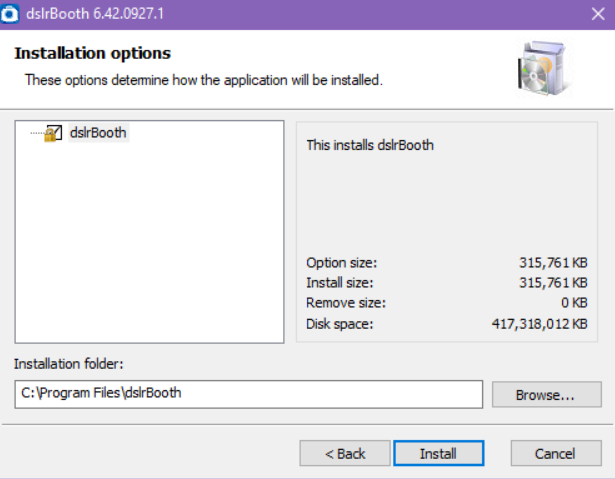
When the app launches, a pop-up screen appears to guide you through the setup process:
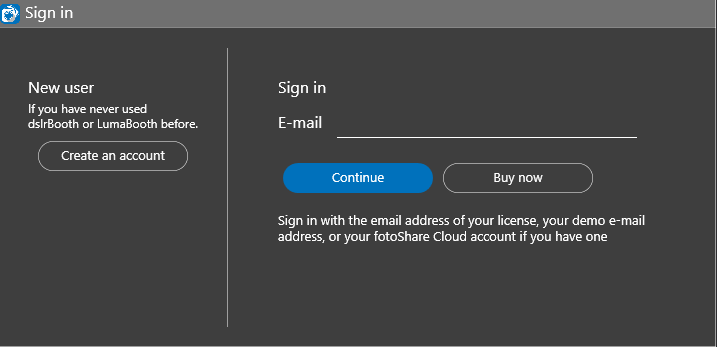
To use dslrBooth, you create a free account and you get unlimited access to the trial. If you want to upgrade later, you’ll have to buy the license from their site and apply it to your account.
You’ll then be prompted to create your first “Event,” which helps keep your files, settings, and user statistics organized.
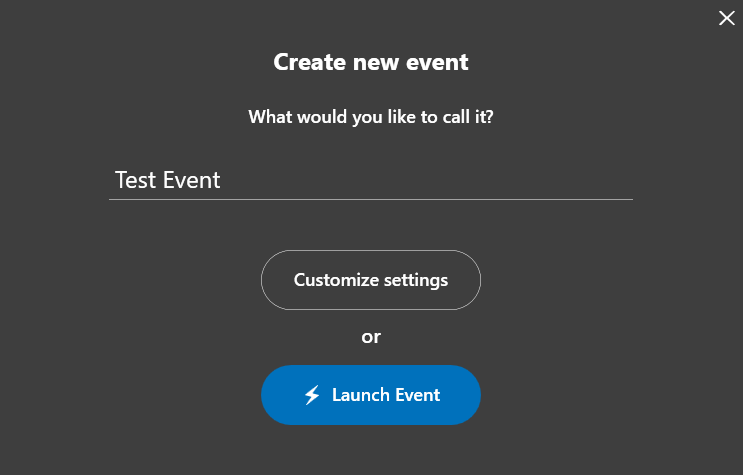
Clicking on “Customize settings” takes you into a robust settings window, offering booth modes, APIs, triggers, and a wide array of checkboxes and sliders.
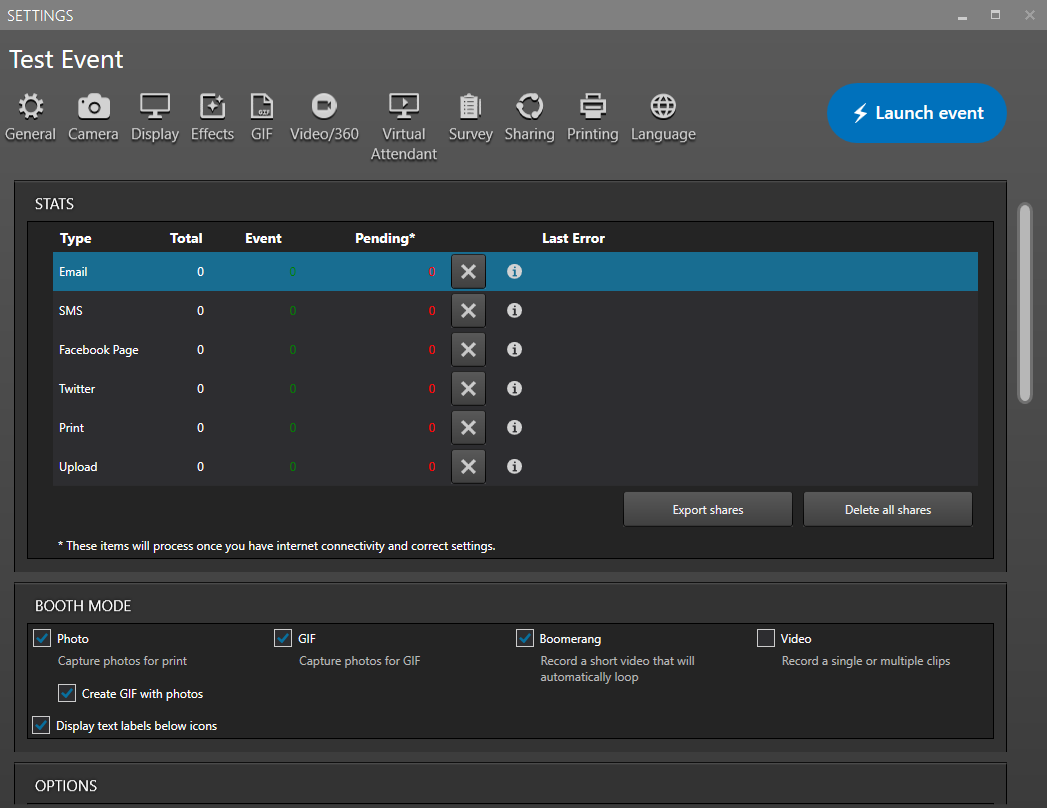
Most people wouldn’t consider dslrBooth a plug-and-play solution. Mastering all the settings can take time—but for photography enthusiasts, that’s part of the appeal.
Once your settings are saved, you’ll land on a home screen with all your events listed in the left sidebar. The rest of the space is dedicated to your custom photo booth frame and the features included in your plan, ready for you to tweak and explore.
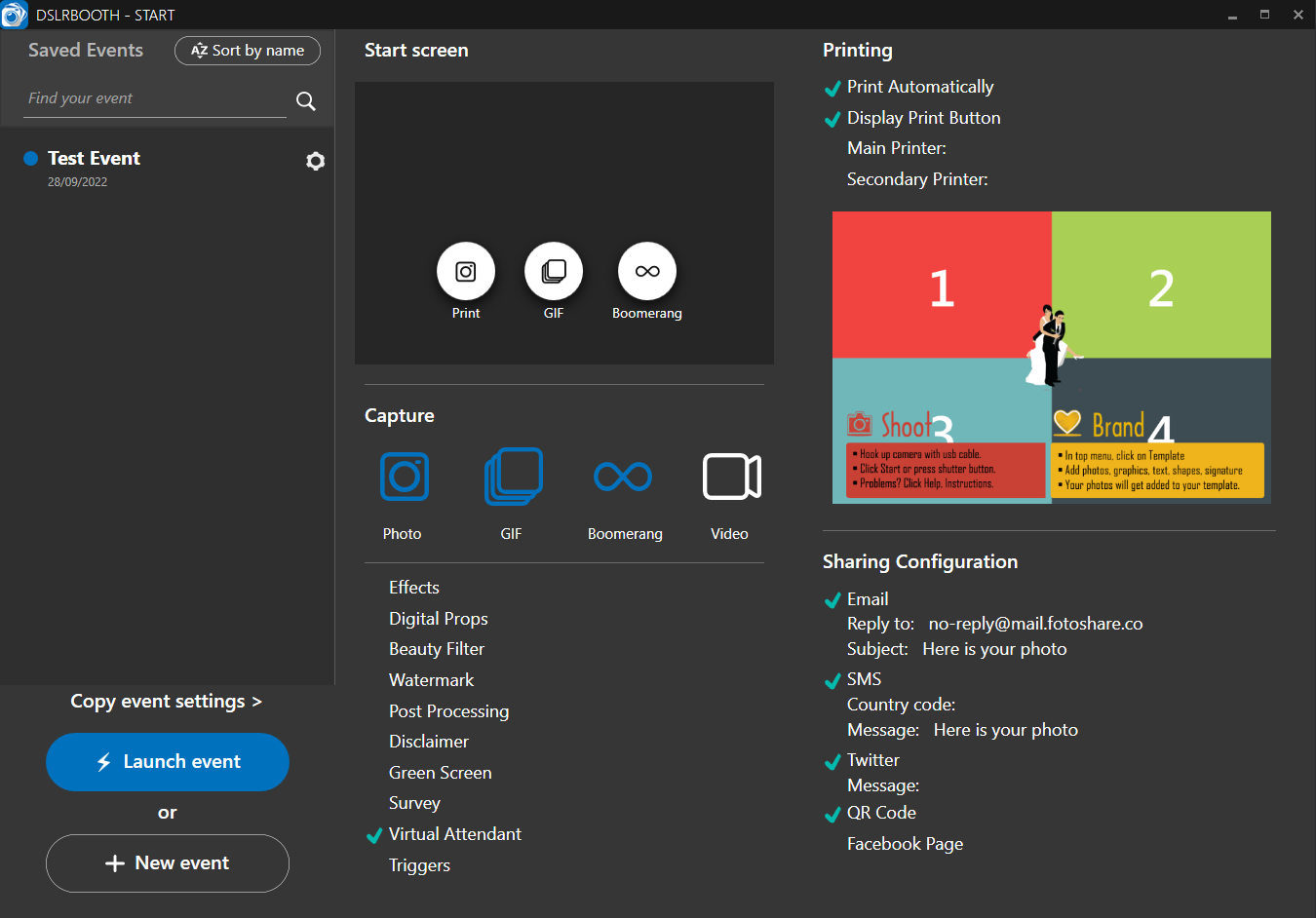
To launch the photo booth, just select an event and click “Launch Event.” If all goes well, you’ll see an interface like this:

The photo-taking interface doesn’t livestream the camera feed—something we found limiting during testing. Once you’re in, you can click one of the three buttons on the screen to take a photo, GIF, or a boomerang video.
Setting everything up and then scrambling into position for a selfie can be inconvenient, which is why dslrBooth gives you the option to scan the QR code and get these triggers on your phone.
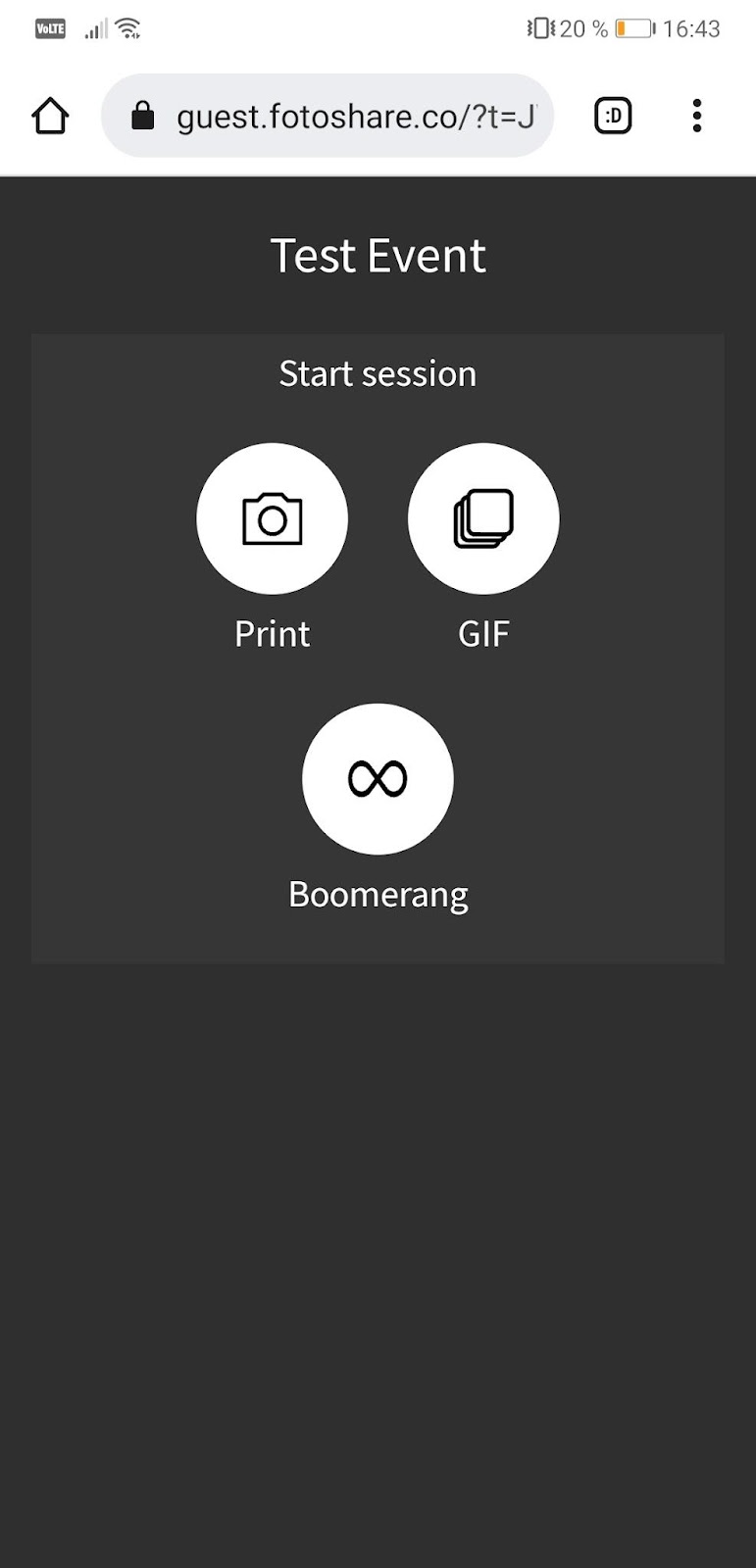
After clicking “Print,” the software took this picture:
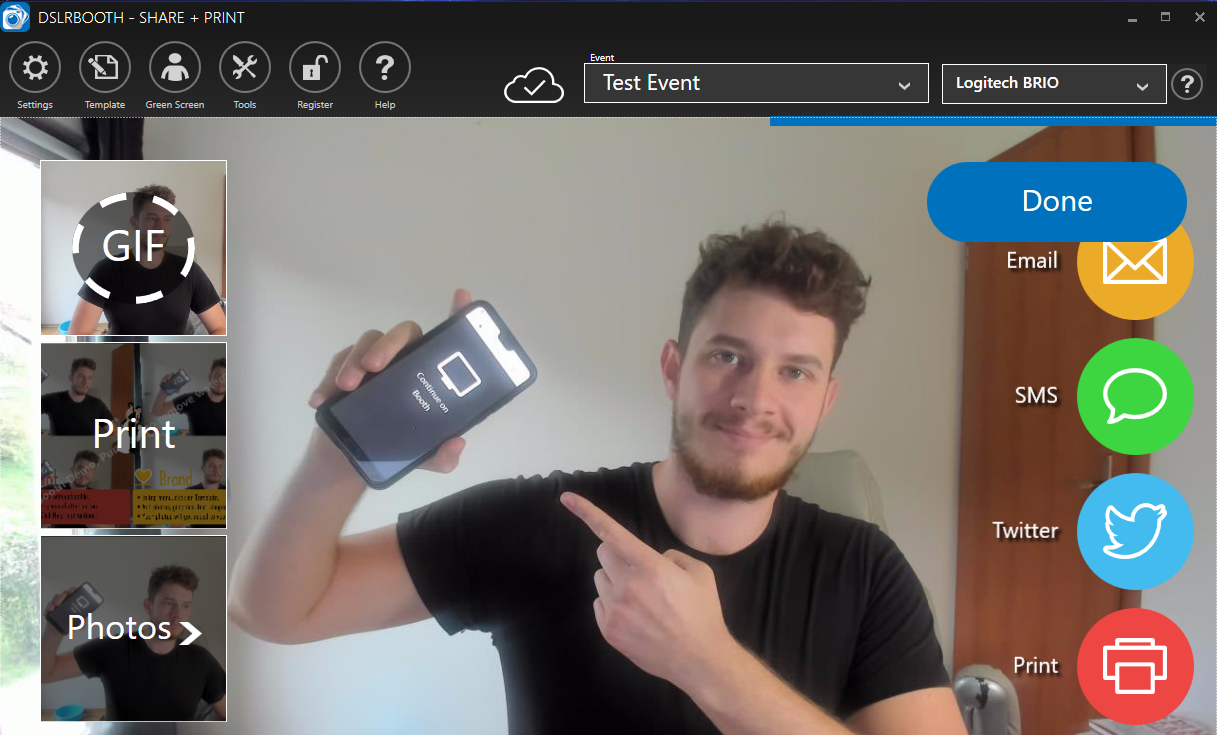
On the left side of the screen, you can switch between a GIF, print (which adds frames and props), and simple photos. On the right side, you can send the picture to your phone or email, print it (provided you have the equipment), or share it on Twitter.
Here’s what the photo-taking process looks like:
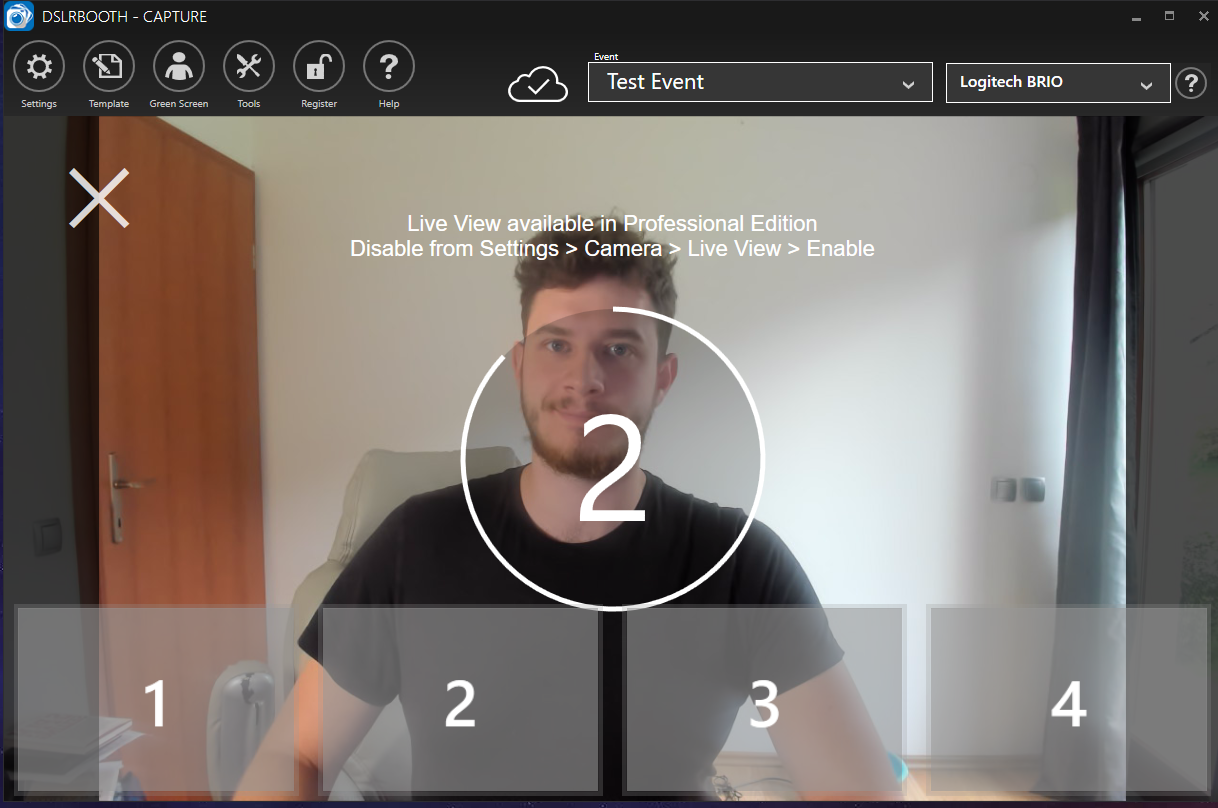
The software also shows prompts to guide users between shots, including:
- “Get ready!”
- “Say cheese!”
- “Last one!”
Overall, dslrBooth feels powerful but technical—ideal for operators who prefer desktop workflows and don’t mind manual configuration.
dslrBooth Software — Pricing
The Standard Edition is listed at $79 as of the latest update.
The Professional Edition is listed at $199 and adds Live View and Green Screen functionality.
Online gallery functionality can be added with a subscription to FotoShare, another product from the makers of dslrBooth.
dslrBooth Software — Conclusion
There’s no denying dslrBooth comes packed with robust settings and customization options. It’s a powerhouse, and a dedicated photographer could absolutely make magic with it. But using it to its full potential takes time—there’s a lot to click through and learn before you get the hang of it.
Performance-wise, even on a high-powered computer, the software showed some lag. In testing, multiple warning popups appeared simultaneously when issues occurred, clicks were followed by 3–4 second delays, and connecting the camera to the app took over 10 seconds.
Still, dslrBooth is a solid option for tech-savvy users with DSLR gear and time to fine-tune their setup. For anyone with a decent camera, a studio light, and a laptop on hand—especially ahead of a wedding or party—grabbing a copy of dslrBooth makes a lot of sense.
It remains one of the strongest desktop-based DSLR choices, as long as operators are comfortable managing their own hardware setups and desktop configurations.
Breeze DSLR Remote Pro — Good For Custom Solutions
Breeze Booth (aka DSLR Remote Pro) is a DSLR photo booth software for Windows PC that only supports DSLR cameras—no webcams or GoPros.

Breeze is built for highly customized permanent and kiosk-style installations where deep hardware integrations matter more than ease of use.
It’s good for professional photographers who want to create robust custom photo booth solutions, such as standalone photo booths that accept digital payments and offer printouts without an attendant.
Breeze DSLR Remote Pro — Notable Features
Breeze DSLR Remote Pro is a highly customizable photo booth software that can be run on a moderately powerful machine. It offers a robust DSLR camera connection, stable performance, and a plethora of add-ons such as:
- Tethered shooting
- Contactless systems
- External buttons and sensors
- Digital payment integrations
As a traditional desktop application, Breeze focuses heavily on printing workflows and hardware add-ons, rather than modern digital sharing or remote device management.
Breeze DSLR Remote Pro — How It Feels To Use It
When you open Remote Pro, you’re greeted by this screen:
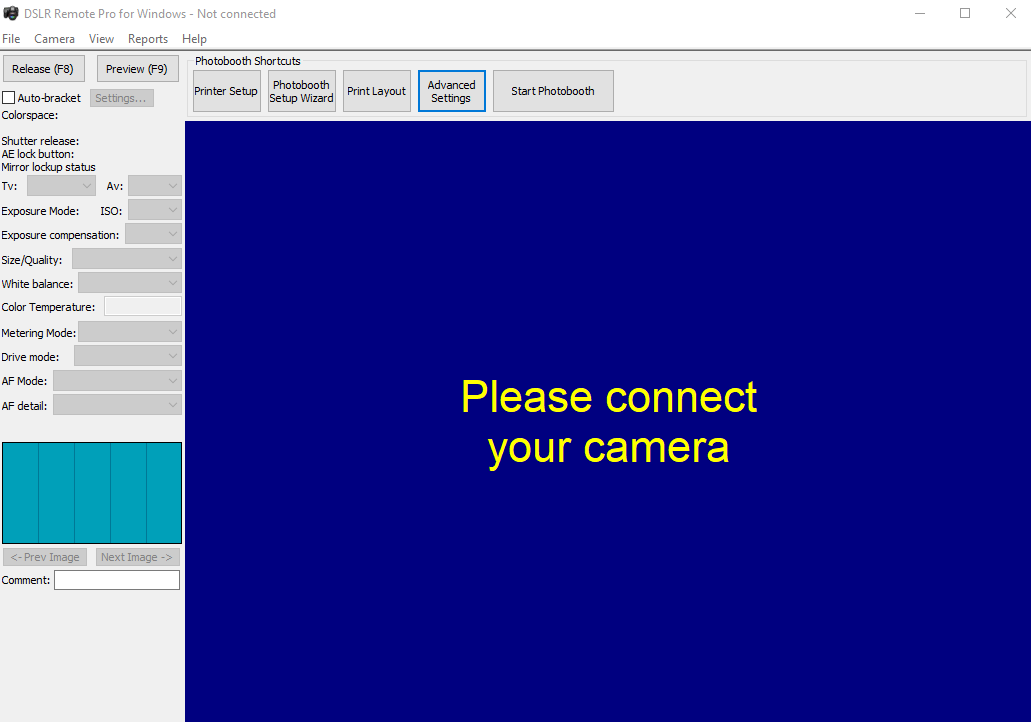
Unlike dslrBooth, this software doesn’t appear to have a clear structure for organizing or saving events. This suggests its primary purpose is to create traditional, stand-alone photo booths that deliver prints—less of an event marketing tool.
If you prefer working with modern-looking programs, this one might feel a bit disappointing. All the settings are scattered across the screen, with lots of inputs and buttons to navigate on your own. It doesn’t seem like much thought was given to the user experience for the operator, which is especially clear in the “Advanced Settings” window:
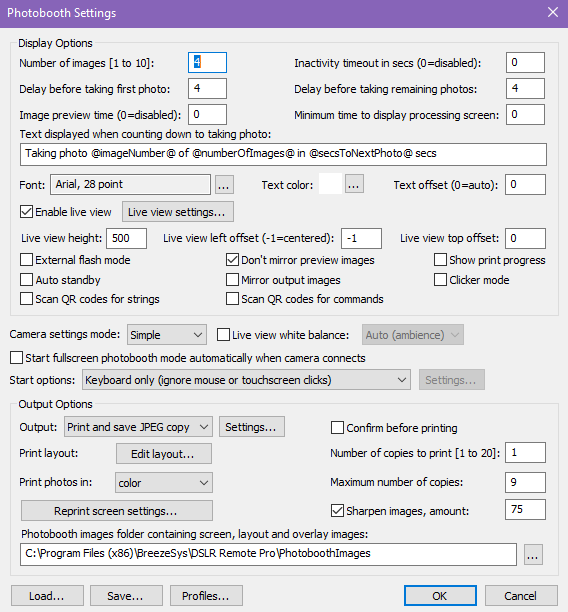
Overall, it felt confusing and took quite a bit of effort to figure out. There are no clear categories, tabs, or visual cues to help you find what you’re looking for—it’s all jumbled together.
Since Remote Pro seems primarily focused on printing photos, we also explored the Print Layout settings. You can see them in this window:
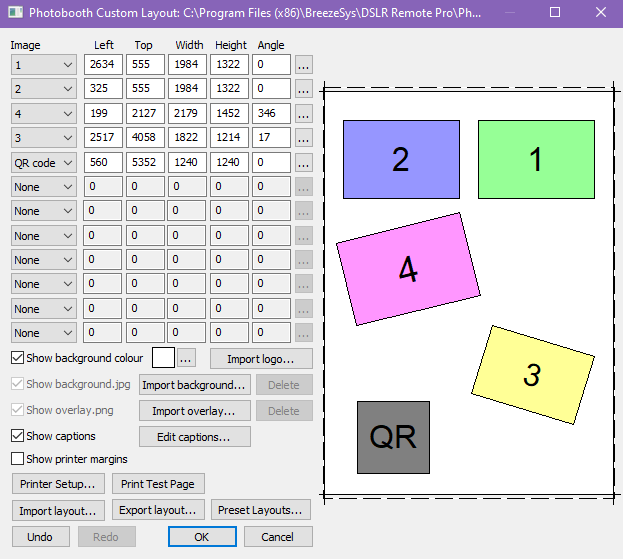
If you can do the pixel math, this window has all the features you need for creating great printouts, including the ability to import a logo or QR code. You can also export and import layouts you’ve made, or pick simple presets provided by Breeze Booth.
Breeze is extremely flexible, but the interface assumes a high level of technical comfort and patience.
Breeze DSLR Remote Pro — Pricing
Pricing for their Windows software + DSLR camera combination is simple: a 15-day free trial, followed by an unlimited-use license for $349 dollars.
Breeze DSLR Remote Pro — Conclusion
While Breeze DSLR Remote Pro is an affordable, powerful, and highly customizable photo booth software, it’s not for everyone.
With robust DSLR camera support, stable performance, and flexible add-ons like tethered shooting, contactless interactions, and digital payment integrations, it’s ideal for professional photographers with a technical background who are comfortable with building self-serve, standalone booths. If you need deep control over print layouts or plan to run unattended kiosks with external sensors or buttons, Remote Pro is a solid pick.
However, the learning curve is steep. The interface feels dated, with scattered settings and minimal visual guidance. For users who value ease of use, intuitive design, or event-based organization, this software may feel clunky and time-consuming.
Breeze is best suited for permanent installations or highly customized rigs—not modern, mobile-first event workflows.
Sparkbooth — Good for Non-techies
Sparkbooth is another DSLR photo booth software for PC that supports Canon and Nikon cameras, plus webcams.
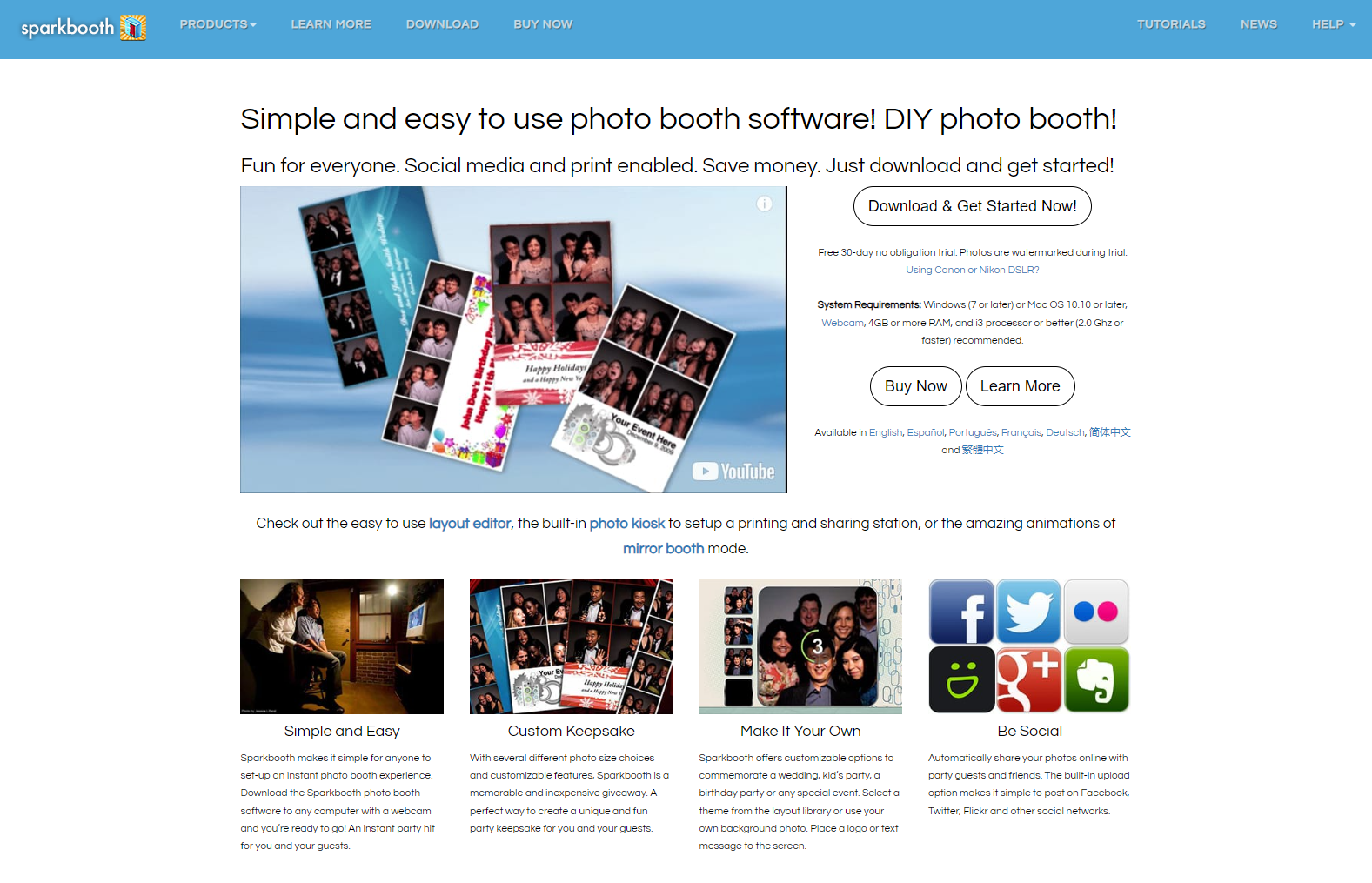
It was designed for non-techies and anyone who doesn’t want to read a textbook-thick manual before setting up their photo booth. The ideal place for this booth would be a party with friends and family.
Unlike the more advanced DSLR apps, Sparkbooth keeps complexity to a minimum and focuses on a friendly, plug-and-play workflow. However, it’s features are also very limited.
Sparkbooth — Where It Stands Out
Sparkbooth stands out for several reasons, especially when it comes to accessibility and ease of use:
- Great camera connectivity
- Very long free trial: 30 days
- Extremely friendly for non-techies
- Great user experience right out of the box
- Very low PC requirements: 4GB ram & i3 processor recommended
Beyond these highlights, Sparkbooth includes all the typical photo booth features—GIFs, photo editing, green screen support, mirror booths, print layout customization, Facebook sharing, email delivery, and more. A major downside, though: Sparkbooth only runs on Windows. It’s not compatible with Mac OS.
Sparkbooth is available in multiple languages including English, Spanish, Portuguese, French, German, Taiwanese, and Chinese.
Sparkbooth — How It Feels To Use It
When you open Sparkbooth, you’re greeted by this screen:
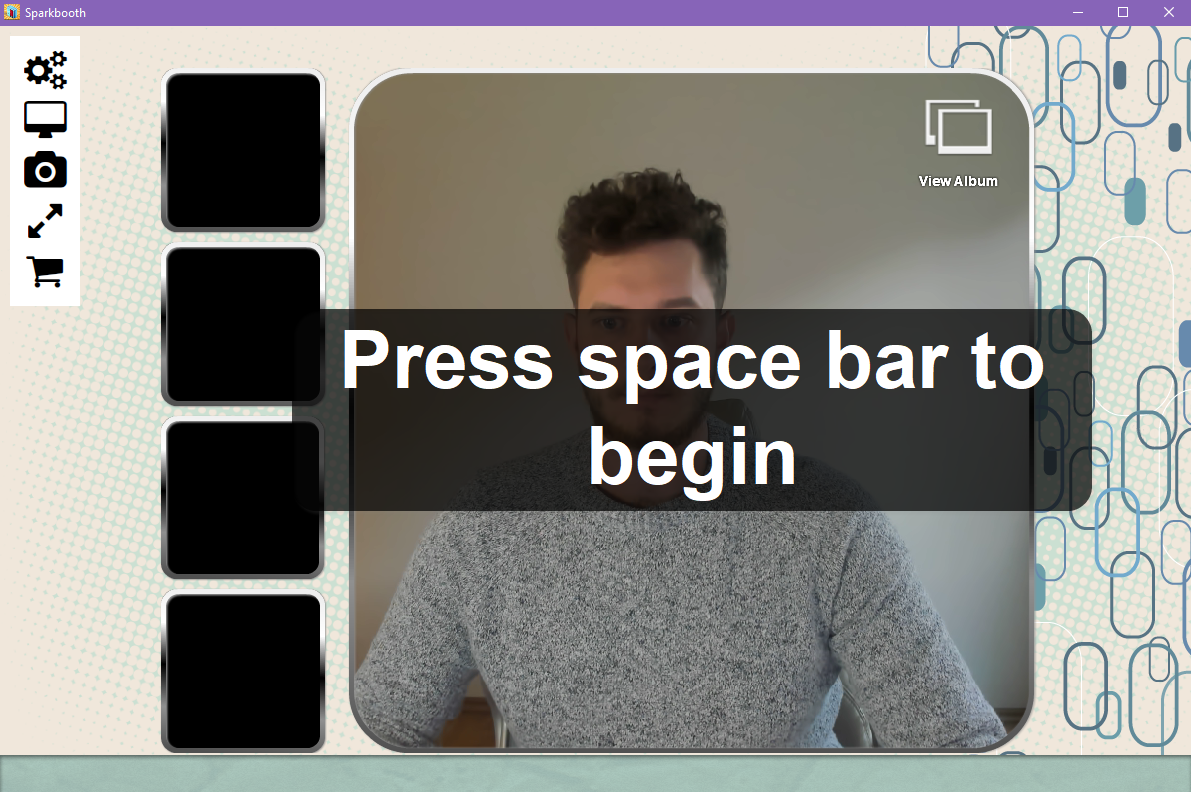
The user experience is streamlined right from the start with no home screen or setup page to navigate. Instead, the software immediately launches into the booth preview with an easy-to-understand interface.
On the left side, you’ll find the essentials: settings and full-screen mode. Also, it detects the camera instantly and without any hassle—something that can’t be said for all DSLR booth options.
After pressing the space bar (the trigger button, which is customizable in the settings), Sparkbooth begins taking photos:
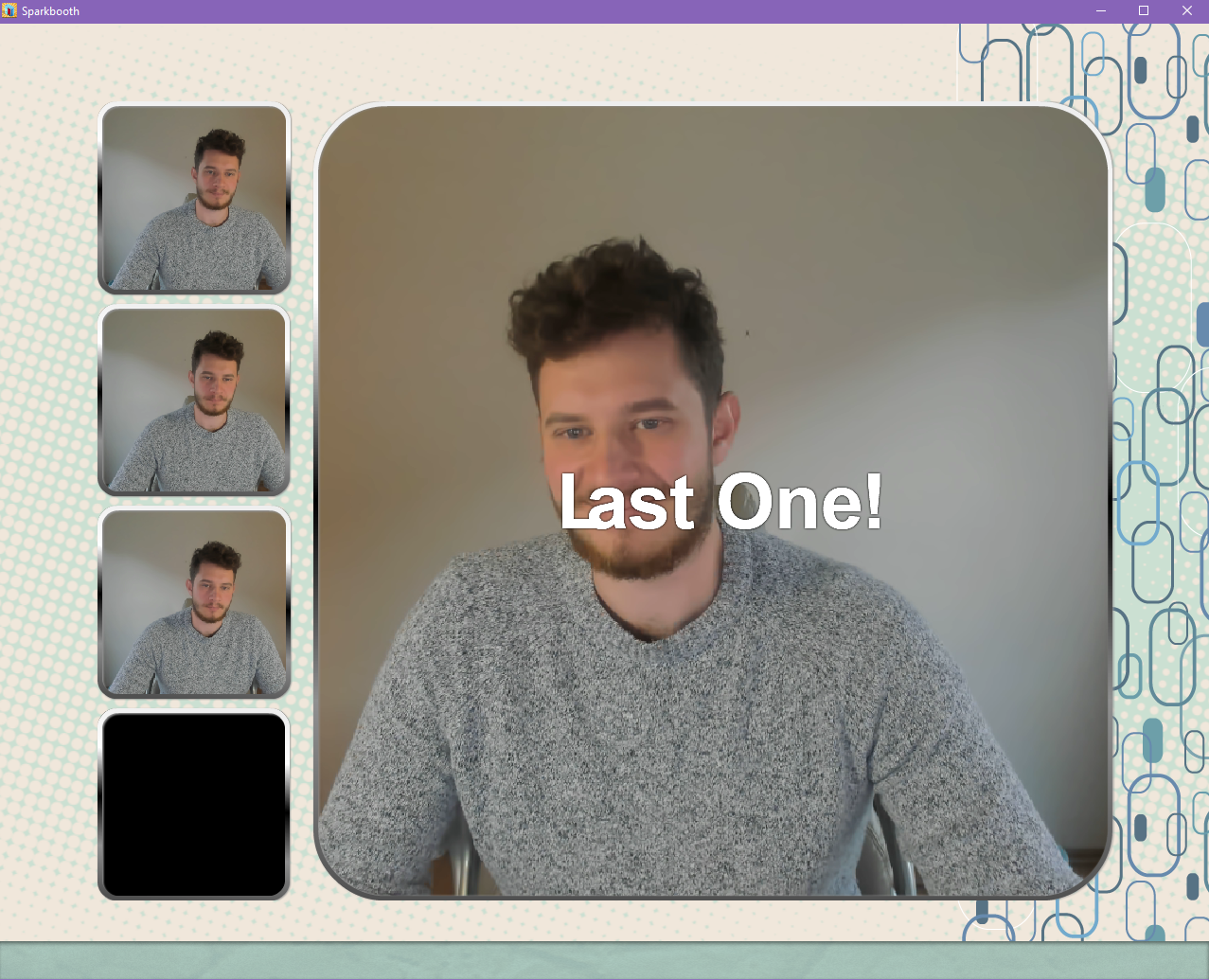
A voice guides users through the process with a countdown with witty remarks.
In the settings, you can swap out the default voice clips for your own, a unique feature that didn’t show up in any of the other photo booth software tested.
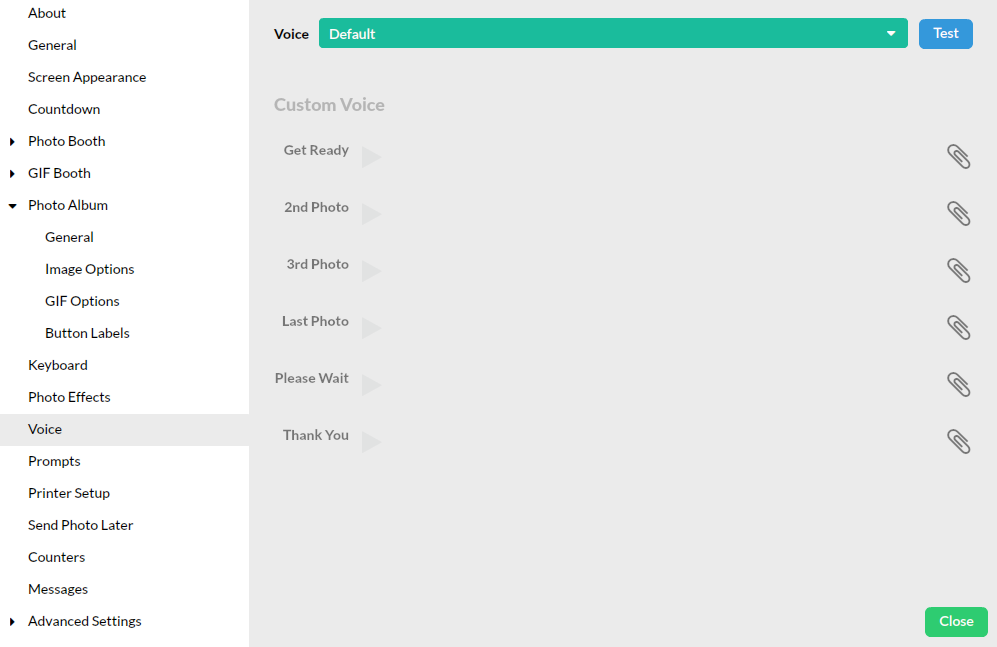
Everything on the left side is neatly organized and stacked, making it easy to find what you’re looking for.
Overall, Sparkbooth delivers a much warmer, more inviting experience than either dslrBooth or Breeze Booth. It’s one of the friendliest choices for casual users on Windows—even if it isn’t built for commercial-scale booth operators.
Sparkbooth — Pricing
Sparkbooth offers a 30-day free trial, which is more than enough time to try everything it has to offer.
Beyond the trial, Sparkbooth offers two lifetime licenses: Premium for $149 and DSLR for $189.
The DSLR version comes with all features and is usable for commercial purposes. It also comes with “three activations.” Meaning, one license can install the software on three separate Windows PCs.
Sparkbooth — Conclusion
Sparkbooth is one of the easiest Windows-based DSLR photo booth software options out there—great for parties, casual setups, or anyone who doesn’t want to mess with complicated settings.
It works with Canon and Nikon DSLRs, as well as webcams, and runs smoothly even on older or lower-powered PCs. The interface is clean, everything’s easy to find, and it just works—no manual required. Features like voice prompts, fast camera detection, and neatly organized settings make the whole experience feel approachable and fun.
It’s a great fit for non-techies, party hosts, and anyone who just wants a simple, ready-to-go photo booth. If you’re building a complex or commercial-grade setup, this might not be the one—and it’s Windows-only.
For small events and DIY use, it’s a solid pick. The 30-day free trial gives you plenty of time to try it out, and the lifetime licenses are budget-friendly, especially with multiple activations.
Darkroom Booth — Good for Attended Photo Booths
Darkroom Booth is a DSLR photo booth software for Windows OS that is packed with features and supports a wide variety of DSLR cameras, including webcams and GoPros.

It’s good for photography professionals who want to operate attended photo booths (where an attendant helps guests through the session) using Nikon or Canon cameras.
Darkroom is built for traditional print-heavy booth workflows and integrates well with accessories like arcade buttons, cash acceptors, and event printers.
Darkroom Booth — Notable Features
In addition to all the standard photo booth tools, Darkroom Booth offers some standout features:
- Slow motion, pose detection, and voice activation
- Can run quizzes and contests to engage people and then pick winners
- Facebook-ready VR 180 & 360 images
- 10-day license for $45, if you have a one-time event
- Coin-op, arcade buttons, bill acceptors, external control
- Lots of support for photographers
Darkroom Booth also offers a lot of support to photographers setting up the booth. Their Help Center is very comprehensive compared to others.
There are even basic data collection features, making it passable for business or marketing use—though it doesn’t offer full-funnel marketing tools, branded galleries, or remote device management like HALO.
While Darkroom is powerful, their product line is complex, and choosing the right option can feel confusing even after spending time on their site. This could be overwhelming for new operators or anyone not familiar with DSLR desktop ecosystems.
Darkroom Booth — How It Feels To Use It
When you open Darkroom Booth, you’re greeted with this screen:
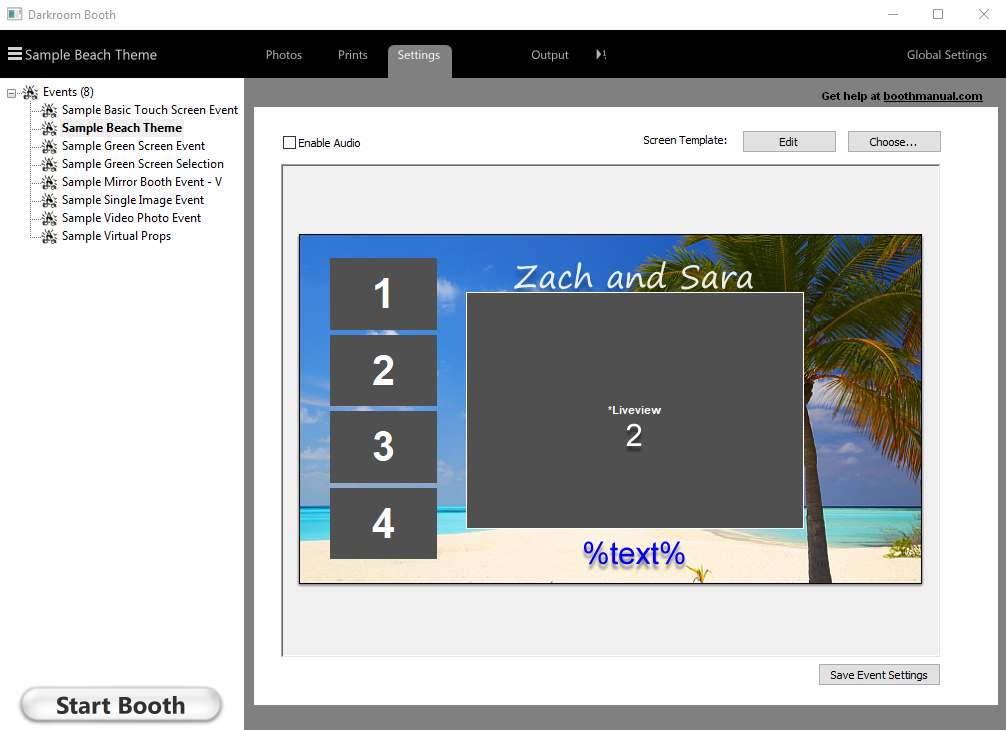
When launching Darkroom, the first screen doesn’t feel like a typical software interface. Button labels like “Settings” and “Global Settings” are vague.
After some clicking around, the booth becomes more understandable. It’s highly customizable and all features are available during the free trial.
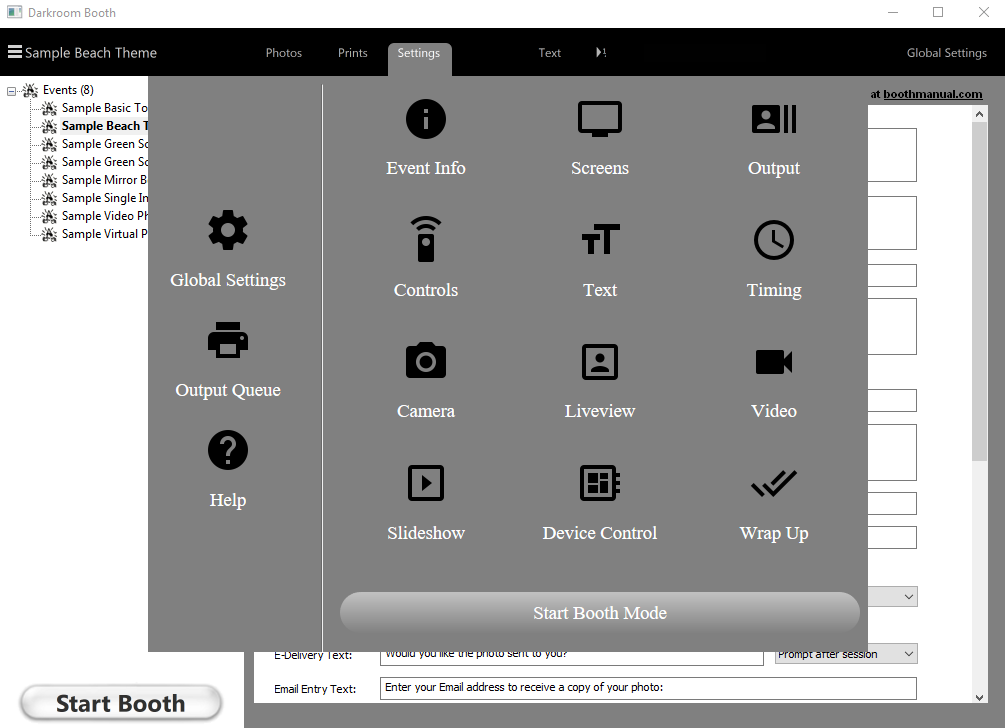
Unfortunately, the experience can become frustrating fast. During testing, the settings interface repeatedly broke, requiring multiple resets.
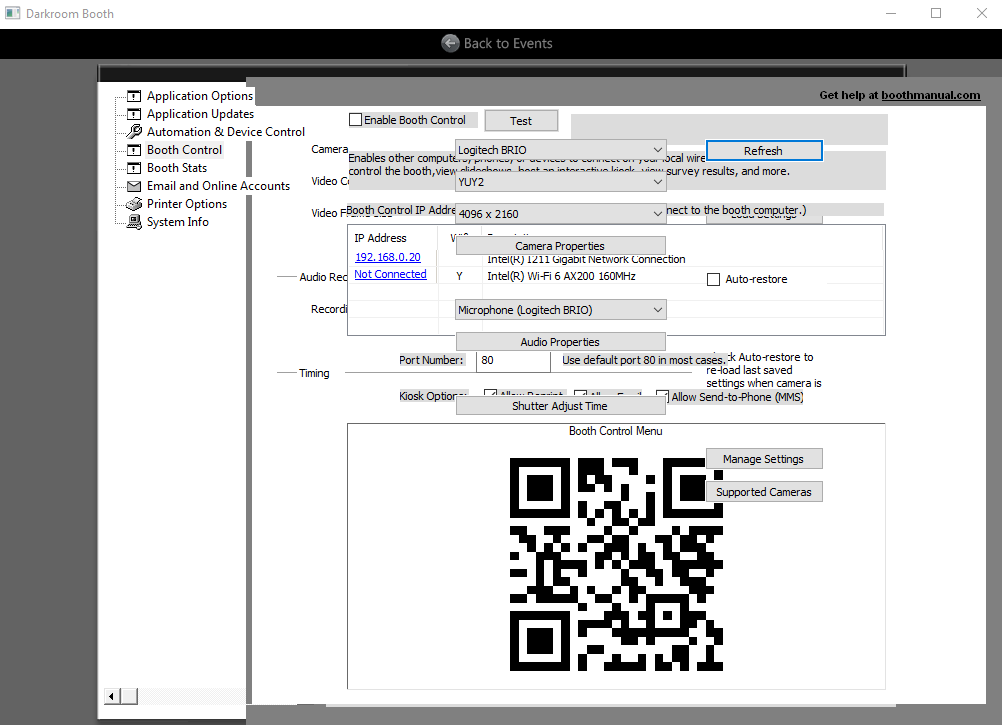
Among all the DSLR photo booth software covered, Darkroom Booth offered the most frustrating setup experience—especially given its premium price.
On the plus side, the guest-facing experience is clean and functional.

Still, the software feels all over the place.
The design is outdated (as is common with DSLR booth apps), but for a premium-priced product, the overall user experience should feel more thoughtful and refined.
Darkroom shines in complex, attended event setups, but much like Breeze, the operator experience requires patience.
Darkroom Booth — Pricing
Darkroom Booth has the most generous free trial on the market: an unlimited trial with all pro features unlocked. The catch is that images are watermarked until you purchase a license.
A full license costs $295, or you can purchase a 10-day license for $45.
The rest of the product suite—Darkroom Core, Darkroom Pro, Hotfolder App, Event Gallery, Booth for iPad, Assembly Edition—adds complexity without clear differentiation.
It’s one of the most expensive DSLR tools but also one of the most feature-packed.
Darkroom Booth — Conclusion
Darkroom Booth’s marketing and website are more polished and comprehensive than some of it’s competitors. With a deep library of self-help content and videos covering nearly every feature and use case, it sets the expectation that the software itself will be just as refined.
But, in our experience, it doesn’t quite live up to the promise. The interface feels dated, the setup process is clunky, and the user experience falls short of what you’d expect at a premium price point.
The Final Verdict on the Best DSLR Photo Booth Software
| Simple Booth HALO | dslrBooth | Breeze Booth | Sparkbooth | Darkroom Booth | |
| Category | Best Overall | Good for DIY Solutions | Good for Customization | Good for Non-techies | Good for Attended Booths |
| Marketing capabilities | ⭐⭐⭐⭐⭐ | ⭐⭐ | ⭐⭐ | ⭐⭐⭐ | ⭐⭐ |
| Feature-rich | ⭐⭐⭐⭐ | ⭐⭐⭐⭐ | ⭐⭐⭐ | ⭐⭐ | ⭐⭐⭐⭐⭐ |
| Customizable | ⭐⭐⭐⭐⭐ | ⭐⭐⭐⭐ | ⭐⭐⭐⭐ | ⭐⭐⭐⭐ | ⭐⭐⭐ |
| Stable | ⭐⭐⭐⭐⭐ | ⭐⭐⭐ | ⭐⭐⭐ | ⭐⭐⭐⭐⭐ | ⭐⭐ |
| Ease of use | ⭐⭐⭐⭐⭐ | ⭐⭐ | ⭐⭐ | ⭐⭐⭐⭐⭐ | ⭐⭐ |
| Back-end UX/UI | ⭐⭐⭐⭐ | ⭐⭐⭐⭐ | ⭐⭐ | ⭐⭐⭐⭐ | ⭐ |
| Front-end UX/UI | ⭐⭐⭐⭐⭐ | ⭐⭐⭐ | ⭐⭐ | ⭐⭐⭐⭐ | ⭐⭐⭐ |
| Pricing | 💲💲 | 💲 | 💲 | 💲💲 | 💲💲💲 |
| Final Score | 33x⭐ | 22x⭐ | 18x⭐ | 27x⭐ | 18x⭐ |
| Buy Now | Buy Now | Buy Now | Buy Now | Buy Now |
The 1st Choice: Simple Booth HALO (33x⭐)
Simple Booth supports Canon DSLR cameras with the latest version of the HALO app (v5.0 and higher), combining DSLR-quality output with modern digital workflows, remote monitoring, and intuitive visual setup tools.
The HALO app captures phone numbers and email addresses, drives social sharing, and provides robust analytics. It’s the complete solution in an easy-to-use and reliable iPad app.
Explore all the plans Simple Booth has to offer, starting at just $24 per week.
The 2nd Choice: Sparkbooth (27x⭐)
Sparkbooth is easy, friendly, and affordable—ideal for casual users and non-technical party hosts. It has solid connectivity with most webcams and DSLR cameras and is a one-time purchase.
The 3rd Choice: dslrBooth (22x⭐)
dslrBooth is a strong fit for hands-on photographers who want full DSLR control and are comfortable configuring desktop hardware.
Final Thoughts
We hope this guide helped you find the DSLR photo booth software that fits your needs—whether you’re building a custom setup, running a business, or hosting a memorable event. Each platform offers something different, and the best choice depends on your goals and workflow.
The Simple Booth HALO app includes DSLR capture with the latest version of the app (v5.0 and higher), combining the image quality of a DSLR with the simplicity, remote management, and modern user experience HALO is known for.
Whichever route you choose, we hope your setup is effortless to run—and creates a lasting impact for your guests and your business.
Looking for a modern photo booth app that’s easy to set up, fun for guests, and a powerful marketing tool?